
Participant
August 3, 2016
Question

HTML5 - Motion Path on a line object not working

  • August 3, 2016
  • 2 replies
  • 1186 views

I'm very much hoping that someone can help. I needed to publish a Captivate 9 project to HTML5 only, because the user needs to be able to print certain slides from the browser and .swf output will not appear when printing. That being said, I have a simple animation of a line moving down to give the illusion of a car going down the road, and after publishing to HTML5 the line does nothing (no movement at all).

There are a few FX on the slide that do work (all Zoom In effects):

But I cannot figure out why the motion path effect won't work. Any assistance is greatly appreciated. Here is another screenshot of the effect settings:
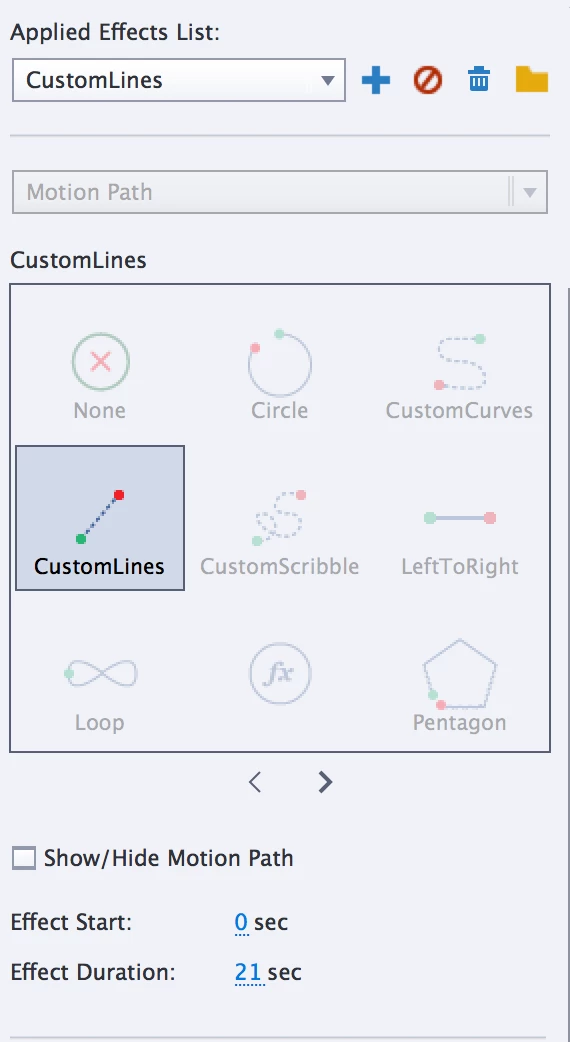
Any help is greatly appreciated!

Thanks,

Andrew

This topic has been closed for replies.

2 replies

sarahkey
Participant
March 29, 2018

I have this exact issue, and I see others have had it in both 9 and 2017. Motions paths do not show on html5 output for LINE items. I spent many hours with tech chat about this issue, and was still unable to resolve it. However, I was able to substitute long, skinny rectangles in place of the lines, and the motion paths did work. Good luck!

eLearning_Pundits
Participating Frequently
March 29, 2018

Sounds a project specific issue. I never had an issue like that.

Possibly you are upgrading a project to Cp2017 from old version eg: Cp9 (initial version)

sarahkey
Participant
March 29, 2018

@elearning Pundits - This is what we thought initially as well. However, when I tried to recreate the slide in a new, blank project, I had the same issue.

agreene71Author
Participant
August 9, 2016

In case anyone is interested (which doesn't appear to be the case here ), I could not get any simple effect to run on a line object when publishing to HTML5 as described above.

As a solution, I created the line movement as a GIF in Photoshop and added it as an animation.

Oh well, the original looked better, but such is Captivate, I guess.

Best,

Andrew

Lilybiri
Legend
August 9, 2016

This works perfectly for me, both Preview in Browser and Preview HTML in Browser:

agreene71Author
Participant
August 9, 2016

Thank you, but this doesn't seem to address the problem. In addition, your slide doesn't have the same exact elements in it, or any other elements for that matter. Since this was not working for me, and I have tried several alternative effects (they didn't work as well), in addition to copying and pasting the slide assets into a blank project, and also creating a new one from scratch, there must be an issue using Captivate's effects on lines in HTML5 when other objects (audio, grouped objects, objects with their own effects, etc.) are present. Or perhaps the slide is corrupted, but that is a separate and larger issue for this software.