


Participant
January 27, 2020
Answered

HTML5 tracker says "Only animation image is supported" for software simulation slides.

  • January 27, 2020
  • 2 replies
  • 2342 views

I am in the process of going through all of our Captivate modules and eliminating any non-HTML5 compliant elements. Several modules contain very long software simulations. On those simulations slides that have some sort of movement on them (i.e., scrolling down a screen), the HTML5 Tracker says, "Only animation image is supported." This indicates to me that these slides will present some kind of problem when published as HTML5. But I don't see any problems when I run the module in the SCORM cloud or when I preview as HTML5 in browser. The "animation images" seem to be working just fine.
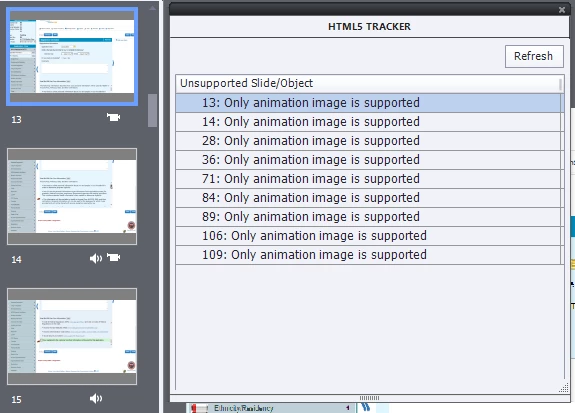


Do I need to modify these slides somehow? Should I just ignore this message in the HTML5 Tracker? What's going on?

This topic has been closed for replies.
Correct answer Lilybiri

Theoretically when publishing to HTML output the FMR-slides (Full Motion Recording) which are originally SWF-based will be converted to MP4 (H264 video format). However from several users here and in other social media, and personally this is not always funcitioning well. For that reason, my approach to software simulations for demonstration goals (not Training/Assessment) has changed. Here are some tips:

  • If possible use Video Demo instead of Software simulation in Demo mode. It is more work to edit, but you can still record in clips, the editor is more powerful and the output quality a lot better. Moreover if wanted (as I do often) you can uplevel the efficiency of the video by converting it to an Interactive Video.
  • If you want to stay with software sim, demo mode, avoid FMR slides whenever possible, by good planning. In many cases scrolling or other mouse movements can be replaced by clicking (not needing a FMR slide). One example: instead of dragging the scrollbar, use clicking it). 
  • I tend to stop the recording in sim mode when expecting a FMR slide which cannot be avoided, and will insert a Video Demo slide (possible with Slides button). After that insertion I will continue with capturing in software sim mode. Seems bit complicated but once you get the idea works nicely and you have a combination of the advantages of software sims (management) with the quality of Video Demo slides which are guaranteed to work in HTML output since they are always MP4-slides after publishing. Moreover you'll have the power of the Video Demo editor.

2 replies

Lilybiri
LilybiriCorrect answer
Legend
January 28, 2020

Theoretically when publishing to HTML output the FMR-slides (Full Motion Recording) which are originally SWF-based will be converted to MP4 (H264 video format). However from several users here and in other social media, and personally this is not always funcitioning well. For that reason, my approach to software simulations for demonstration goals (not Training/Assessment) has changed. Here are some tips:

  • If possible use Video Demo instead of Software simulation in Demo mode. It is more work to edit, but you can still record in clips, the editor is more powerful and the output quality a lot better. Moreover if wanted (as I do often) you can uplevel the efficiency of the video by converting it to an Interactive Video.
  • If you want to stay with software sim, demo mode, avoid FMR slides whenever possible, by good planning. In many cases scrolling or other mouse movements can be replaced by clicking (not needing a FMR slide). One example: instead of dragging the scrollbar, use clicking it). 
  • I tend to stop the recording in sim mode when expecting a FMR slide which cannot be avoided, and will insert a Video Demo slide (possible with Slides button). After that insertion I will continue with capturing in software sim mode. Seems bit complicated but once you get the idea works nicely and you have a combination of the advantages of software sims (management) with the quality of Video Demo slides which are guaranteed to work in HTML output since they are always MP4-slides after publishing. Moreover you'll have the power of the Video Demo editor.
Participant
January 28, 2020

Thanks so much for this!

Lilybiri
Legend
January 28, 2020

Yiou're welcome, maybe not the easy solution you expected.

Paul Wilson CTDP
Community Expert
Community Expert
January 28, 2020

You're fine. When Captivate captures software simulation is does create an SWF file for full-motion recording but during the publishing process, these get converted to MP4 files. It will be interesting when the next major release of Adobe Captivate comes out if they will change this process to a non-SWF recording. Time will tell, however you have nothing to worry about for today. You can ignore these warnings in the HTML5 Tracker.

Paul Wilson, CTDP
bentwest
Participant
January 8, 2021

Thanks for posting this. A few slides that were pulled over from PowerPoint and contain no animation at all still had the 'Only animation inage supported' message in the HTML5 tracker. Confusing.

Lilybiri
Legend
January 8, 2021

Indeed, very confusing. You would not have that warning if you replaced the FMR slide by Video Demo slides which publish natively to MP4, totally compatible with HTML5 output.