Participant
April 13, 2020
Question

HTTP Error

  • April 13, 2020
  • 1 reply
  • 203 views

When I uploaded the archive in the SAP Platform, i received this error message:
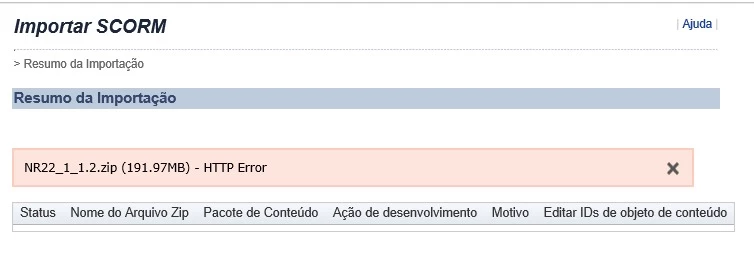
What it could be?

    This topic has been closed for replies.

    1 reply

    RodWard
    Community Expert
    Community Expert
    April 14, 2020

    Are you sure you have correctly published a SCORM archive?  I would normally suggest you try uploading the same zip archive to SCORM Cloud, the online LMS.  But I can see that your zip archive is nearly 200 megabytes and the free version of SCORM Cloud has a 50 megabyte limit.  So, unless you have access to another LMS (e.g. Moodle) that you could use as a test platform, you might just need to open up your zip archive and look for files that have SCORM in their name.  If you see them, that would generally indicate you have published to SCORM standard.  If you do not see any files like that (e.g index_scorm.html) then you may just need to republish from Captivate with the SCORM reporting settings turned on in Quiz > Settings > Reporting.

    gslageAuthor
    Participant
    April 14, 2020

    The archive was published as a SCORM 1.2, the problem is that i don't have acces to the LMS that my client are using.

    I published a test Scorm with 3mb and it worked well.

    Is it possible that this error is due the large size?

    RodWard
    Community Expert
    Community Expert
    April 14, 2020

    Yes it is VERY possible the error is due to the size of the SCORM.  Most LMSs have some sort of limit on the upload file size.  You should ask the LMS Administrator if this limit can be increased.  However, with SAP there always seem to be huge complications when wanting to change anything about the way the system works.  So don't be surprised if the answer is that the limit is 100 megabytes (or something like that) and they tell you that you need to break your course up into smaller modules.