Participant
December 23, 2024
Answered

I am still using Captivate 2019 and the Continue button on my result slide does not work.

  • December 23, 2024
  • 1 reply
  • 239 views

I am still using Captivate 2019 and the Continue button on my result slide does not work even though I set up Pass/Fail parameters to jump to different slides.  So if the user fails, they jump to one slide and if they pass, they jump to another.  When I fail, and click Continue, nothing happens.  I haven't tried to pass yet.


I searched the community but did not find any other resolution.  Anyone have any other ideas?

    This topic has been closed for replies.
    Correct answer RodWard

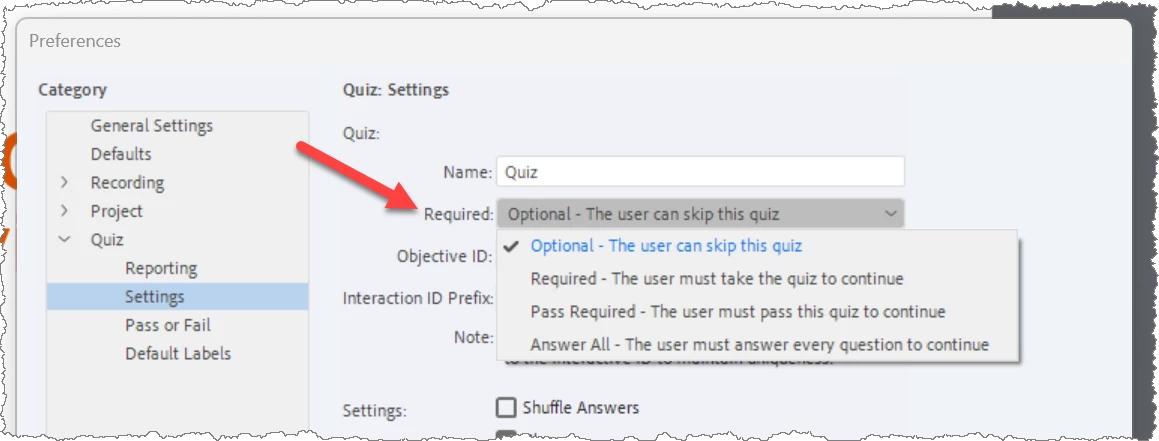
    Please test again and this time pass.  If that then allows you to progress beyond the Quiz Results slide, your issue may be due to the settings you have selected in the Required dropdown menu shown below.

    The safest setting here is the one I have shown selected which has a somewhat misleading name because if the user does skip the quiz, that doesn't mean they would still pass.


    If you have this dropdown set to Pass Required, then your user will be stopped at the Quiz Results slide unless they pass.

    1 reply

    RodWard
    Community Expert
    RodWardCommunity ExpertCorrect answer
    Community Expert
    December 24, 2024

    Please test again and this time pass.  If that then allows you to progress beyond the Quiz Results slide, your issue may be due to the settings you have selected in the Required dropdown menu shown below.

    The safest setting here is the one I have shown selected which has a somewhat misleading name because if the user does skip the quiz, that doesn't mean they would still pass.


    If you have this dropdown set to Pass Required, then your user will be stopped at the Quiz Results slide unless they pass.

    Participant
    December 24, 2024

    @RodWard Thank you very much. It was the settings.  I changed it to Answer All and it worked.  Happy holidays.