karenb77363387
Participant
October 18, 2016
Answered

I am using Captivate 9 free trial - no trim button

  • October 18, 2016
  • 1 reply
  • 686 views

I am getting frustrated - I've done a screencast, and all is going well, except that there is no Trim/Pan area at the bottom of my screen, and I want to trim a slide. Any ideas? Is it because it's the trial version?

    This topic has been closed for replies.
    Correct answer Lilybiri

    If you want to trim and pan, you need to make a Video Demo, a cpvc project.

    A cptx project consists of static slides, panning can be done during capturing.

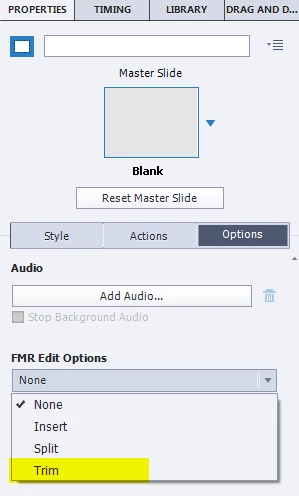
    Only some movements like scrolling will be captured as short movie slides, the so-called FMR-slides (Full Motion Recording). For those FMR slides, in the Properties panel you'll find a limited set of editing tools: Trim is one of them.

    I think you expected the Trimming and Panning button that you have in the Video Demo editor (cpvc project).

    1 reply

    Lilybiri
    Legend
    October 18, 2016

    How did you create the screencase: with a cptx project (Software simulation is indicated on the Welcome screen) or with a cpvc project (indicated as Video Demo)?

    The trial version is fully functional.

    karenb77363387
    Participant
    October 18, 2016

    Hi there - I just recorded the screencast and left all the settings as is. I can see that it's .cptx  

    Lilybiri
    LilybiriCorrect answer
    Legend
    October 18, 2016

    If you want to trim and pan, you need to make a Video Demo, a cpvc project.

    A cptx project consists of static slides, panning can be done during capturing.

    Only some movements like scrolling will be captured as short movie slides, the so-called FMR-slides (Full Motion Recording). For those FMR slides, in the Properties panel you'll find a limited set of editing tools: Trim is one of them.

    I think you expected the Trimming and Panning button that you have in the Video Demo editor (cpvc project).
