


Known Participant
June 15, 2012
Frage

I can't type text with special Spanish characters (Captivate 6)

  • June 15, 2012
  • 4 Antworten
  • 8097 Ansichten

Hi there,

I've just downloaded Adobe Captivate 6 to try it out and found that I can't type some special characters widely used in Spanish language: our accents or tildes (that's the Spanish word for them). That's what I can't type:

  • Á or á
  • É or é
  • Í or í
  • Ó or ó
  • Ú or ú

I've checked the fonts on my font manager, but that's not the problem. They're fine.

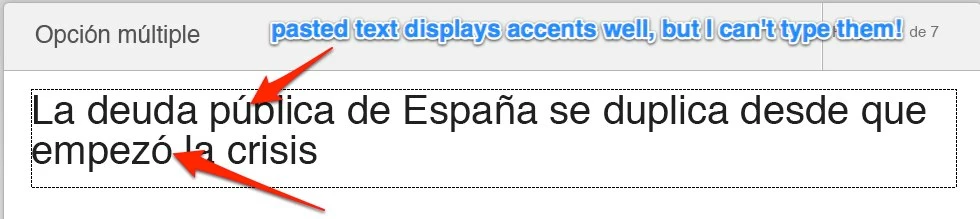
I've also tried to paste some text with these characters from Firefox and it worked fine. You can see it on the image:
So I guess it must be some annoying bug.

Can anyone help me?

Thanks in advance.

Best regards,

Iñaki

Dieses Thema wurde für Antworten geschlossen.

4 Antworten

Participating Frequently
January 30, 2021

Hola Iñaki. Es totalmente desalentador. Si me dijeran si recomiendo Adobe Captivate mi respuesta es que no. Es imposible escribir un acento. Es un error gigantesco. Sigo sin solucionarlo.


scruffylad
Participating Frequently
August 7, 2014

And as a complete aside, kinda disheartening that this post is two years old and there is still not a working function for user input for Spanish characters when you're using an English keyboard.  How could this get overlooked?  Unless I'm missing something, in which case I will apologize de antemano.

Participating Frequently
November 7, 2020

Seis años despues sigue pasando con Captivate 2019. Alucinante.

Participant
January 29, 2021

Captivate 2019 en Big Sur, me sigue pasando, esto es un error en Mac,  sigo sin encontrar solución.

scruffylad
Participating Frequently
August 7, 2014

I am using Captivate 8, and am having the same problems.  My issue may be slightly different from what y'all are talking about, as I am a high school Spanish teacher, and so there are no Spanish keyboards available.  My students will be working off a standard QWERTY board.  I've tried all the shortcuts that usually work with ctrl and alt keys with no success.  My students will occasionally need to enter those characters, and I've been looking for a way for them to enter that info into the text input boxes, but I'm not finding one.  I've even tried to create a button that will enter the needed characters into the box without any success.  Any suggestions on how to solve this problem?  What am I overlooking?

Lilybiri
Legend
June 15, 2012

I am Dutch speaking, and ë ê are working fine, but those are 'second' combination characters. I just discovered that 'third' combinations on my keyboard like ~´`are not working. We do not need them so much in Dutch, that should be the reason. So sorry about that, should have checked (was in prerelease), will try to find out.

Are those 3rd as well for you (to be invoked with Alt-Gr)? I checked and it was possible to use those characters in CP5.5. As soon as I have more information, will be back.

Lilybiri

Lilybiri
Legend
June 16, 2012

I contacted the Adobe team. Are those characters also 3rd for you (do not have a Spanish keyboard)? They told me that they have tested Spanish, so I'm a bit puzzled. Do you use the Spanish version of Captivate or another one?

Meanwhile I was able to install the final release (was still working on a previous prerelease version) and now the combination characters work fine (like in 5.5). Please, if you stilll have issues, could you answer my questions?

Lilybiri

Known Participant
June 20, 2012

Hi,

Yeah I have a Spanish Keyboard (the last model from Apple) and it works with every app except Adobe Captivate. And yes, the version of the software I'm using is the Spanish one. So I have a Spanish keyboard and the Spanish app, and it still doesn't work!

This is is quite weird, I know.

Just let me know if you find something out. This story of copying and pasting is a pain in the teeth...

Thanks a lot!