
Question
+ icon when you drag an image on stage?
Hello All,
Whenever an image is dragged on to the stage from the library for instance, my mouse icon is loaded with a plus sign:
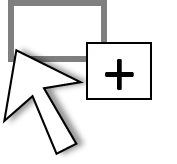
I can't find any documentation, but in playing with it, it seems that if you drag an image from the library, into the gray space around the stage and let go, that the image automatically snaps to the top left corner of the stage. Is this the correct use for this option?
What else can be shared/learned with this feature?
Anyone using it?
What else should we know?
Thanks,
 AdChoices