
Participant
April 12, 2017
Answered

IE 11 error disconnect when all screens not visited

  • April 12, 2017
  • 2 replies
  • 539 views

We have created a series of modules in Captivate 9, published to SCORM 1.2. We are only publishing HTML5. We receive the following error on every module: "AN ERROR HAS OCCURRED WITH YOUR LESSON. If you continue, your activity may no longer be saved. It is recommended that you CLOSE THE LESSON and relaunch it." This error occurs only when the user tries to close the lesson using either the close button on the browser window or the close icon in the lesson. It also only occurs when the user hasn't viewed every screen in the lesson and when they're using IE 11.

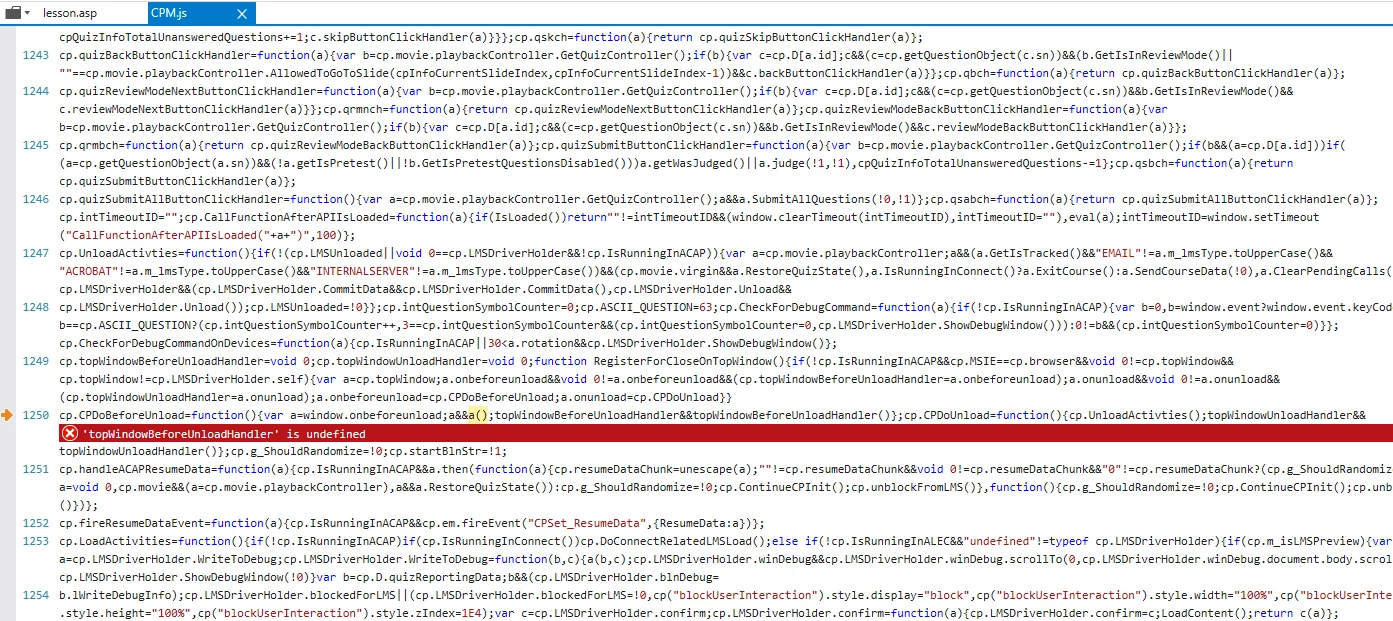
The LMS actually records the lesson's activity properly. So there is no practical problem. However, the error is generating support calls for our client. Has anyone else seen this and been able to work around it? The attached error report, along with some help from our LMS provider (Inquisiq) suggests it's a java script error.

Best,

John
This topic has been closed for replies.
Correct answer Optera Group

We ended up just deleting ";topWindowBeforeUnloadHandler&&topWindowBeforeUnloadHandler()" from the cpm.js file in the lines that began with "cp.CPDoBeforeUnload=function()" and that worked.

Best,

John

2 replies

Optera GroupAuthorCorrect answer
Participant
April 19, 2017

We ended up just deleting ";topWindowBeforeUnloadHandler&&topWindowBeforeUnloadHandler()" from the cpm.js file in the lines that began with "cp.CPDoBeforeUnload=function()" and that worked.

Best,

John

Participant
April 17, 2017

To make this easier to search, the error in IE is "topWindowBeforeUnloadHandler is undefined" in the cpm.js file. It appears a few others have had this issue too but no answers so far. There was one suggested fix - adding the following to SCORM_utilities.js:

function topWindowBeforeUnloadHandler() {
  
return false;
}

This didn't work for me.

Best,

John