Inspiring
March 1, 2017
Answered

If/Else not working

  • March 1, 2017
  • 1 reply
  • 259 views

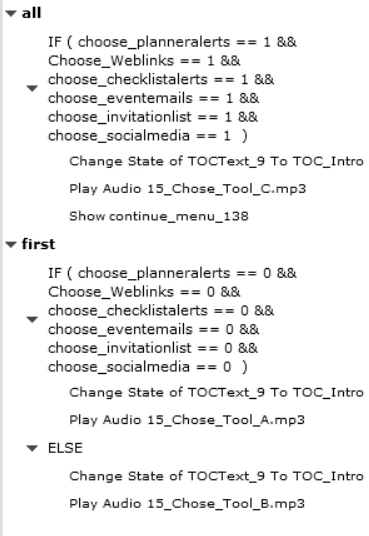
Help! Why isn't this working? The continue button shows, but the wrong audio plays.

I have reversed the order of these two decisions, and still the FIRST decision audio will not play.

Am I missing something? How do I make decisions stop if the first one is correct but go forward if it's not?

Thanks.

    This topic has been closed for replies.
    Correct answer Lilybiri

    I invited you to post here, was on LinkedIn.


    It is not possible in Captivate's advanced actions to get out of the action if a condition results in True. You have to be aware of the fact that all decisions will be evaluated and that you have to be careful that later decisions do not override previous decisions. I have solved quite a lot of similar problems for clients.

    In this case, I don't have the full picture yet, but try to take out the Else part in the last decision, because that will override the first decision which will result in having the B audio always playing, never the C clip. Create another decision instead of the ELSE part.

    Update: I just did read your question on LinkedIn again, because you didn't post all of it here.

    You will need a tracking variable as well, because the third decision has to be different from the first decision to have the third audio clip playing.

    Maybe a counter: default value = 0. On Enter for the slide 1 you increment that variable by 1. I don't remember the real scenario, but suspect that the counter will have to be at least 2 for the third decision.

    1 reply

    Lilybiri
    LilybiriCorrect answer
    Legend
    March 1, 2017

    I invited you to post here, was on LinkedIn.


    It is not possible in Captivate's advanced actions to get out of the action if a condition results in True. You have to be aware of the fact that all decisions will be evaluated and that you have to be careful that later decisions do not override previous decisions. I have solved quite a lot of similar problems for clients.

    In this case, I don't have the full picture yet, but try to take out the Else part in the last decision, because that will override the first decision which will result in having the B audio always playing, never the C clip. Create another decision instead of the ELSE part.

    Update: I just did read your question on LinkedIn again, because you didn't post all of it here.

    You will need a tracking variable as well, because the third decision has to be different from the first decision to have the third audio clip playing.

    Maybe a counter: default value = 0. On Enter for the slide 1 you increment that variable by 1. I don't remember the real scenario, but suspect that the counter will have to be at least 2 for the third decision.

    JGarrouAuthor
    Inspiring
    March 2, 2017

    Thank you! I figured it out.

    Here's the action on the button:

    And here's the action on slide enter