Maybe you didn't understand my question about 'simple action' vs. standard action.? This post explains the difference, why the simple action releases the playhead.
Why choose Standard over Simple action? - Captivate blog
In Captivate 9, you have the possibility to use a simple action, but you have to uncheck the highlighted feature in this screenshot to prevent the playhead from being released:
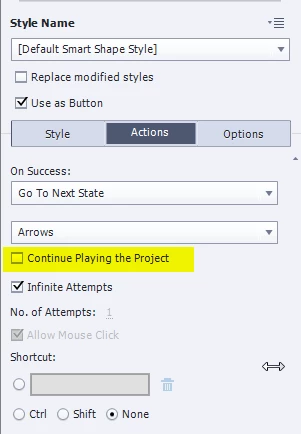
You are showing a shape button in the screenshot (but not the Actions tab, too bad. I don't understand the link with your first post, where you say that you use an image as a button, but this shape button has a gradient fill, not an image as fill? How to do that is explained in: Turn an Image into a Button - Captivate blog
Be careful: it happens that a shape button is not disabled when it is hidden (that was the case for interactive objects until some version, not sure which one). To be sure it is really disabled, my practice is to always create a standard (shared) action that will first disable the button, then hide it:
Disable SB_one
Hide SB_one
Same to make it again clickable, only showing will not always do the trick, you'll need:
Show SB_one
Enable SB_one



 AdChoices