
michelem22350618
Known Participant
December 23, 2019
Answered

Image filled shape as a button

  • December 23, 2019
  • 9 replies
  • 576 views

I am using image filled shapes as buttons.  If I temporarily hover my mouse over the button before clicking on it , the button turns brown.  Once I click, the image re-appears and the proper effect is applied. But this temporary disapearence is still disconcerting.  What setting should I be looking for to try to rectify this problem.  
This topic has been closed for replies.
Correct answer Lilybiri

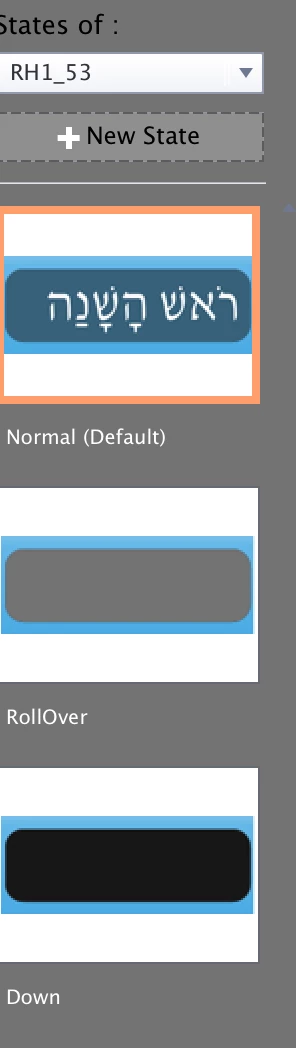
OK.  I think this is what you are looking for.  I see the brown image in the state panel, but I don't understand how it got there.  I never defined any states for this object.  Can I reslove this problem by selecting the rollover state and using image fill?


Rollover and Down states are different from the Normal state, that is why you see something changing when hovering over the image button. Moreover a shape button will also shrink when pressed. Please add the image also to the two other states.

9 replies

Lilybiri
Legend
December 23, 2019

Can you check the Object State panel? What is the Rollover state? 

michelem22350618
Known Participant
December 31, 2019

The object state panel says normal.

Lilybiri
Legend
December 31, 2019

Can you show that panel, please?