


Participating Frequently
November 29, 2023
Answered

Image Theme Won't Save

  • November 29, 2023
  • 2 replies
  • 575 views

Hi,


I'm trying to apply a preset theme to my images. When I select Project Properties > Edit Theme > Image, select an Image Present, then click Apply, then add a new image, the image doesn't not appear using the preset theme because the preset theme that I chose wasn't saved. I know it wasn't saved because when I go back into the Project Properties > Edit Theme > Image menu, the default normal Image Preset is selected instead of the image preset that I chose. How do I get the image preset to save? See screenshot.


Please help. Thanks!
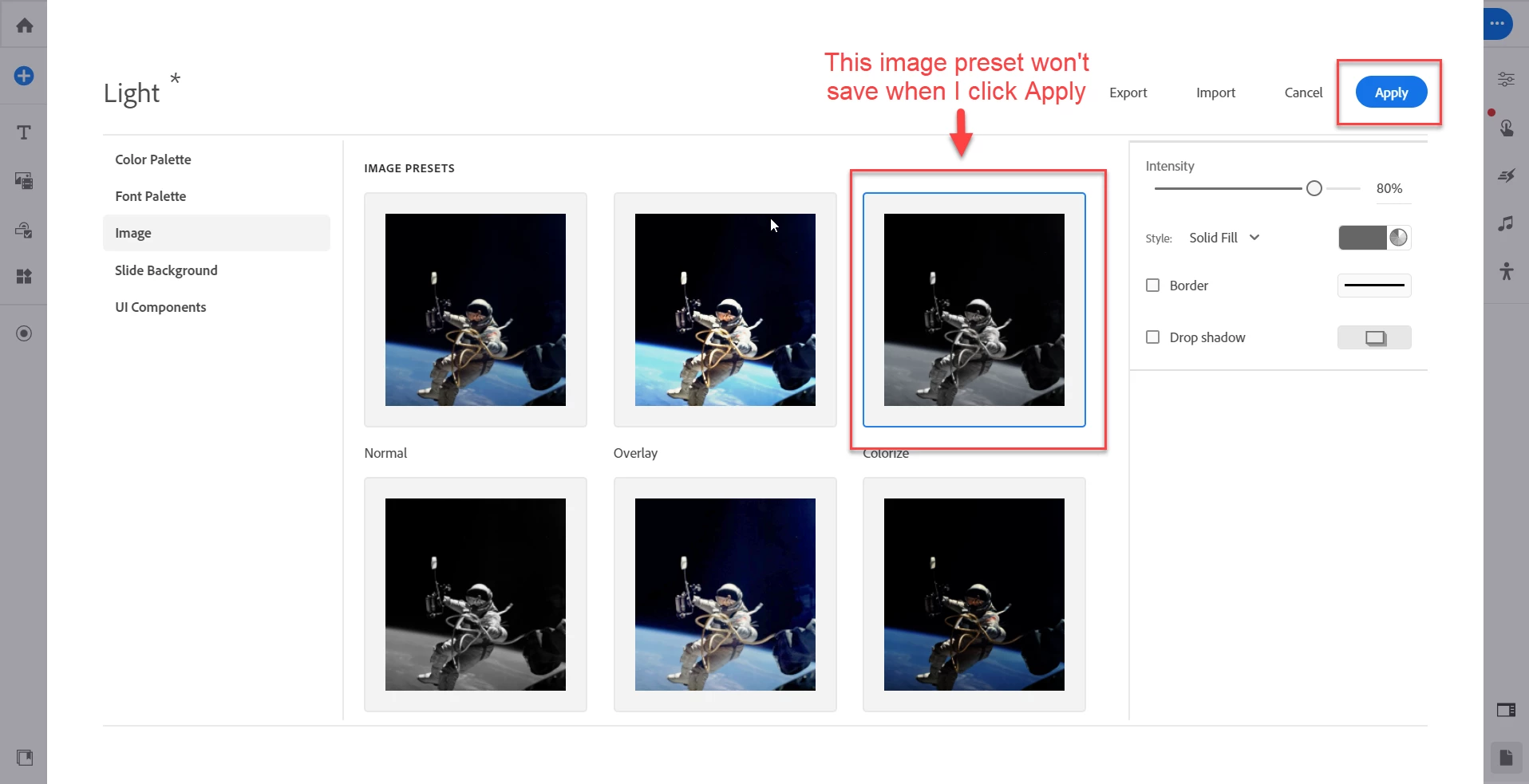
    This topic has been closed for replies.
    Correct answer Lilybiri

    Got it. That's kinda frustrating. I'm new to Captivate and I'm starting on version 12. I checked About Captivate and I am indeed on 12.2.0.19. Do you have any idea how I can get Captivate Classic? Do I have to subscribe to that separately?


    Thanks for all the help!


    Just download it from the Adobe site. You are entitled to use it along with that new version. Reason: too many features are still missing in version 12. However, the UI, the terminology, the workflows are rather different in the much more powerful Captivate Classic. 

    https://helpx.adobe.com/captivate/help/captivate-downloads.html


    2 replies

    adtiwari
    Adobe Employee
    Adobe Employee
    December 1, 2023

    hi Gricious,
    Selection is not equivalent to setting a preset as a default preset, but worklfow of selection corresponds to, selecting the preset and updating its properties inside theme editor and then hit apply, which would reflect for image when you insert image and choose the corresponsing image preset for which you updated properties inside theme editor.
    You can raise an enhancment to set a preset as default @7469361://captivate.uservoice.com/forums/939318-adobe-captivate.
    This behavior is same even for text presets.
    Morevover if you still want to set a preset as default, this is something which is defined currently in design options file of the corresponding content block/object/widget.

    regards,
    Aditya

    Lilybiri
    Legend
    December 1, 2023

    It is clearly not an intuitive behavior when you are used to the powerful Themes in previous releases.

    The real problem is that you cannot change the default Preset which will be used automatically. Only workaround is to edit the present first Preset.  Is there somewhere an overview of all the styles in the Theme?  It is very confusing.

    What I meant about the Text styles is that you can easily edit the default ones you use, whereas the Presets for other items are a lot more difficult to edit. I have already launched a features request to be able to change the default Preset to one of the others available. It is waiting moderation.

    Lilybiri
    Legend
    November 29, 2023

    Sighing... you are using version 12. Themes are rather buggy, had the same experience for images.  Only text styles seem to be really functional. I just updated to version 12.2.0.19 and will have to test if something has been improved, didn't have time so far. Are you on the most recent release?

    griciousAuthor
    Participating Frequently
    November 29, 2023

    Thanks for the quick response! I'm using version 12.2.0. See screenshot. I checked for updates from within Captivate but it said this was the latest version. How did you get 12.2.0.19?


    Lilybiri
    Legend
    November 29, 2023

    I had lot of problems, tried to update from the Help menu. However there was no warning to close Captivate, and the update got messed up and Captivate crashed completely. I had to uninstall and reinstall both Captivate 12 and Captivate Classic. Apparently you already have version 12.2. Can you check the full version number under 'About Captivate' which you find either under the Help (Win) or the Captivate (Mac) menu?
