
ted-thermo
Participating Frequently
June 29, 2018
Answered

Importing PowerPoint slides: Cannot select which file to import

  • June 29, 2018
  • 1 reply
  • 454 views

The first time I tried to import PowerPoint slides, I had no problem. From the Captivate file I was working on, I went to File > Import > PowerPoint Slides... , I was prompted to select a PowerPoint file, and then I was given the option to select all, or some of the slides from the PowerPoint file. Great.

The problem:

Later, while working with the same Captivate file, I needed to import slides from another PowerPoint file. Again I went to File > Import > PowerPoint Slides... . However, I was not prompted to select a PowerPoint file. Instead, this is the window that opened:
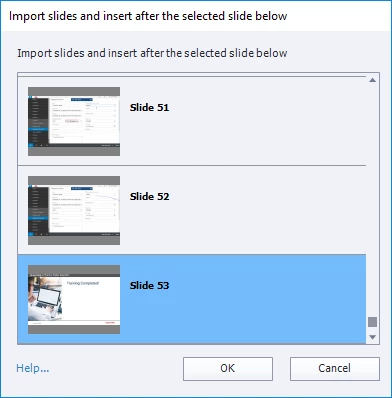
The PowerPoint file is already selected for me. But I don't need to import more slides from this PowerPoint file. I need to import slides from another one.

However, I see no option to select another PowerPoint file.

What can I do now?

This topic has been closed for replies.
Correct answer KyleOdie

The dialogue window is asking where you want to import the slides. It allows you to import slides somewhere other than the end of your project. If you want the additional slides at the end of your project (slide 53), just hit okay. You will then be given an option to upload a different file. Let me know if that doesn't work for you.

1 reply

KyleOdieCorrect answer
Participating Frequently
June 29, 2018

The dialogue window is asking where you want to import the slides. It allows you to import slides somewhere other than the end of your project. If you want the additional slides at the end of your project (slide 53), just hit okay. You will then be given an option to upload a different file. Let me know if that doesn't work for you.

ted-thermo
Participating Frequently
June 29, 2018

Thank you for your answer. I see that after I click OK, I'm able to select the PowerPoint file I want to import slides from. I was confused, because I was expecting that I would be prompted to select the PowerPoint file first.

Your answer is correct, and very helpful. Thank you for your prompt response.

Participating Frequently
June 30, 2018

NP, and you aren't crazy for being confused

I had to play with it for a little while until I figured it out. It isn't real intuitive.