July 14, 2014
Answered

In Question slide, When I enable the next button, the button look faded off in HTML 5 output.

  • July 14, 2014
  • 1 reply
  • 510 views

Hi,

I am enabling the next button in Captivate 7 quiz slide. I am using these slides as CYUs. When I publish the slides, the web version looks fine, but the HTML 5 output shows the next button with faded look. I tried creating a new quiz slide from a separate file and inserting here. still the same issue is cropping. Please help in resolving this issue.

Given the image for reference.

    This topic has been closed for replies.
    Correct answer RodWard

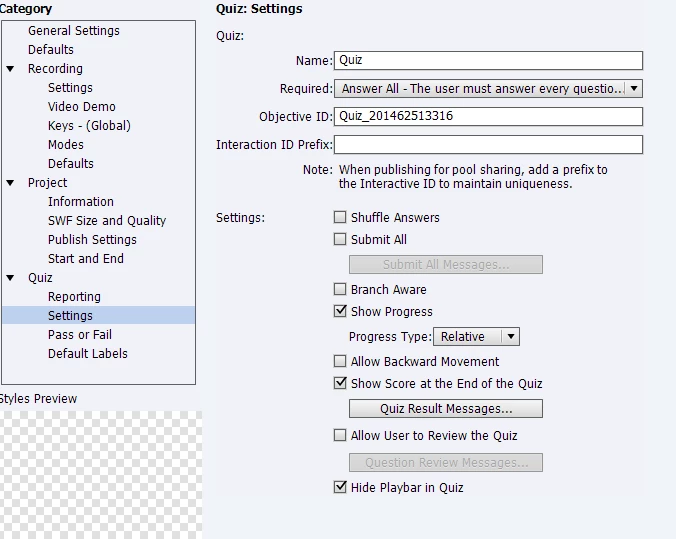
    I have attached the quiz setting for your reference. Please check the same.


    So..you see where the Required field says "Answer All - The user must answer every question..."

    Well...THAR'S YA PROBLEM!

    Set it back to Optional and see if that fixes your issue.

    1 reply

    Lilybiri
    Legend
    July 14, 2014

    Which theme are you using?

    July 14, 2014

    Clean blue theme.. but I am modifying the button colors to suit my color theme. The rest of the buttons appear fine except for this button.

    RodWard
    Community Expert
    Community Expert
    July 15, 2014

    What setting do you have for Quiz > Settings > Required?  Is it set to something that would force the user to answer the quiz question before being allowed to continue?