
tpj2015
Participating Frequently
July 9, 2015
Answered

Individual object names all changed to Smart Shape in properties window

  • July 9, 2015
  • 1 reply
  • 416 views

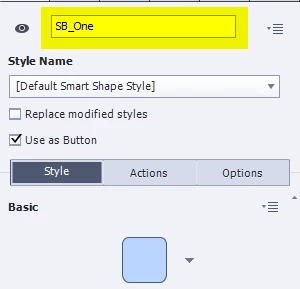
I'm new enough to Captivate that perhaps this isn't an issue and more of a learning issue. But, the objects I am using as buttons are all now called "Smart Shape" in the properties panel and timeline. I am having an issue finding a way to identify the correct object to target with actions. The only time I can see there are actual object names/id's still there are when I attempt to build an advanced action.

I am using Captivate 8 on Mac 0SX 10.10.3.

Thanks ahead for any insight on this issue.
This topic has been closed for replies.
Correct answer Lilybiri

I suspect that you are not looking at a slide, but at a master slide? Objects on a master slide have never an ID.

For objects on normal slides you can edit the generic name in the Properties panel as before.

And that name appears in the Timeline panel

1 reply

Lilybiri
LilybiriCorrect answer
Legend
July 9, 2015

I suspect that you are not looking at a slide, but at a master slide? Objects on a master slide have never an ID.

For objects on normal slides you can edit the generic name in the Properties panel as before.

And that name appears in the Timeline panel

tpj2015
tpj2015Author
Participating Frequently
July 9, 2015

I see. Thank you for the insight. That is helpful to know, though it is odd that it works that way. An object is an object and it's ID should be available regardless of scope. I suppose I'll put that in the wish list.

Again, thank you for your expert help.

Lilybiri
Legend
July 9, 2015

Yes, please file a feature request. It would be great to be able to control objects on the master slides.
