
Known Participant
November 28, 2016
Answered

Insert hyperlink to PDF in Library

  • November 28, 2016
  • 5 replies
  • 2335 views

hey all,

My client has some PDF resources they want included in the Captivate project. Basically, they want hyperlinks (words) to link to the PDF documents so it opens in a new window. I have imported the PDFs into the Library, inserted a Text box, and tried to insert a hyperlink. For the life of me, I cannot figure out how to point the hyperlink to the Library in Captivate!  This seems like something that the tool should do out of the box. Am I missing something?  Please help as my deadline is coming due 12/1!

Jason
This topic has been closed for replies.
Correct answer BDuckWorks

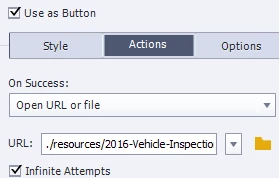
My approach has been to include the PDFs in the project folder, and use 'open URL' as the action.

I've created a 'Resources' folder that I copy to the published project folder, and to the SCORM ZIP file before uploading that makes the relative path: "./resources/<filename>.pdf"

5 replies

Known Participant
November 29, 2016

This was a very good approach and similar to what I ended up doing. Basically, I created a text box with a hyperlink. The hyperlink "address" was simply the name of the PDF. I then prepared the SCORM and opened the ZIP. I added all of the PDFs to the root of the ZIP and when I uploaded to the LMS, it worked.

Known Participant
November 28, 2016

Thanks for the quick reply. So, you mean that we'd have to include this on the webserver in the same folder and update the link as such?

So, this doesn't work from the library?

Lilybiri
Legend
November 28, 2016

You can include it in the   published folder if you don't want to post it separately on a webserver (has the advantage of being easier to edit the pdf), as I mentioned in my answer. I also explained that only embedded objects (or 'colleagues' like the original wav files for audio clips) are in the Library and you don't embed a pdf.

Forget to tell: make sure you set the PDF to open in a new window.

Lilybiri
Legend
November 28, 2016

Library is for assets that can be embedded in the Captivate file. For PDF's you have to use the command 'Open File'. Make the path pointing to the pdf relative (only the pdf-name). After publishing you have to store the pdf's in the root of the published folder.

Captiv8r
Legend
November 28, 2016

Hi there

Normally the PDF content is left outside the library and exists on the server or wherever alongside the output files. You then use a Button, Click Box, or Smart Shape configured as a button to Open a URL or File. You simply supply the filename.

Example: SomeFile.PDF

Cheers... Rick

BDuckWorks
BDuckWorksCorrect answer
Inspiring
November 28, 2016

My approach has been to include the PDFs in the project folder, and use 'open URL' as the action.

I've created a 'Resources' folder that I copy to the published project folder, and to the SCORM ZIP file before uploading that makes the relative path: "./resources/<filename>.pdf"