Participating Frequently
January 29, 2021
Answered

insert video / youtube does not account for buffering and cuts the end off

  • January 29, 2021
  • 3 replies
  • 700 views

using Captivate 2019 V 11.5.1.499 to insert youtube video and it doesn't matter if I use "Media (button) / video" or interactive video, the result is the same:

  • Captivate places a timeline element that is the duration of the video
  • you cannot extend the duration of the video on the timeline, properties or edit feature
  • eg. if a 10 second video buffers for 3 seconds before playback begins, then the last 3 seconds of the video are cut off
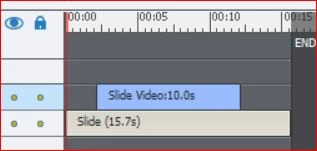
Of course this is on slide video because Captivate won't allow youtube on Event videos.


Question: how do you extend the element to allow enough time for the youtube embed to fully play?

Thanks,


    This topic has been closed for replies.
    Correct answer robyn_zee

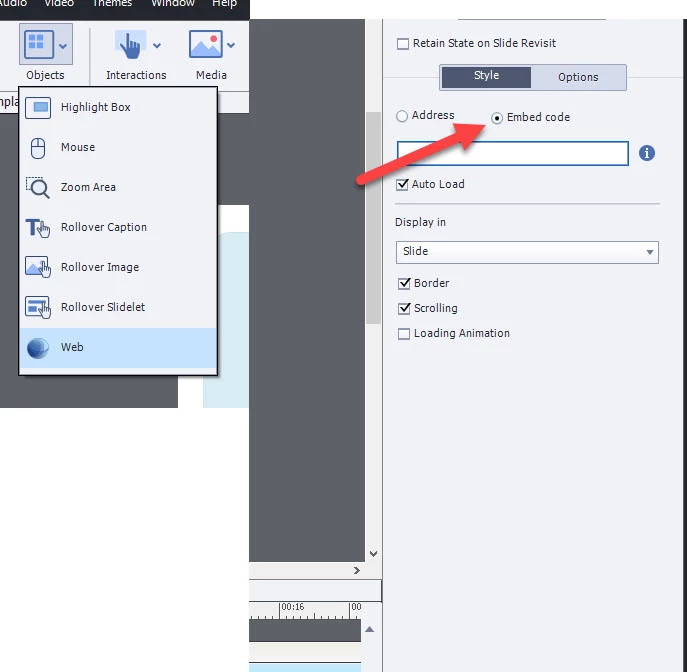
    Hi Jeff, I've found that it cuts off the videos a little abruptly too. My favorite way to add in videos is as a web object, and then with the object you selected under properties, select embed code. There are a lot of great websites that will let you generate a custom embed code with the features you want. (ie/ closed captioning on, no youtube logo/branding, custom start and stop times, etc.) From there you can copy and paste the embed code into your Captivate for the Embed code. It works great! 

    3 replies

    robyn_zee
    Participant
    January 30, 2021

    This is one of my faves or generating the embed code: YouTube Custom Embed Generator - Classy Nemesis

    Lilybiri
    Legend
    January 30, 2021

    This is not really related with the question, but I see that you are not yet using the most recent release which is 11.5.5.553. Please update!

    Participating Frequently
    February 1, 2021

    Yes I wish I could, I work for a large organization and we get uupdates when IT schedules, which is hopefully soon. Cheers,

    robyn_zee
    robyn_zeeCorrect answer
    Participant
    January 29, 2021

    Hi Jeff, I've found that it cuts off the videos a little abruptly too. My favorite way to add in videos is as a web object, and then with the object you selected under properties, select embed code. There are a lot of great websites that will let you generate a custom embed code with the features you want. (ie/ closed captioning on, no youtube logo/branding, custom start and stop times, etc.) From there you can copy and paste the embed code into your Captivate for the Embed code. It works great! 

    Participating Frequently
    January 29, 2021

    Robyn  that works so well!!  thank you! it seems strange to avoid the tools that say "video/youtube" but hey, I'll take the win, thanks for sharing!