
Participant
November 2, 2018
Question

Internal Error and Publish Failed

  • November 2, 2018
  • 2 replies
  • 1366 views

Captivate 2019 ver. 11.0.1.266

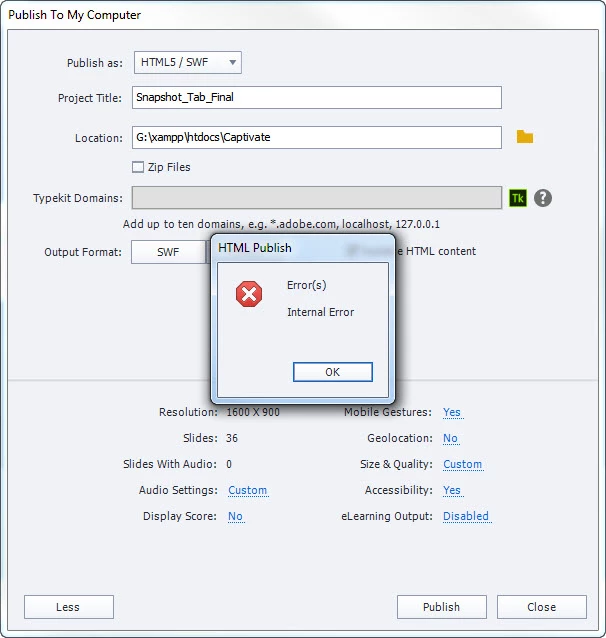
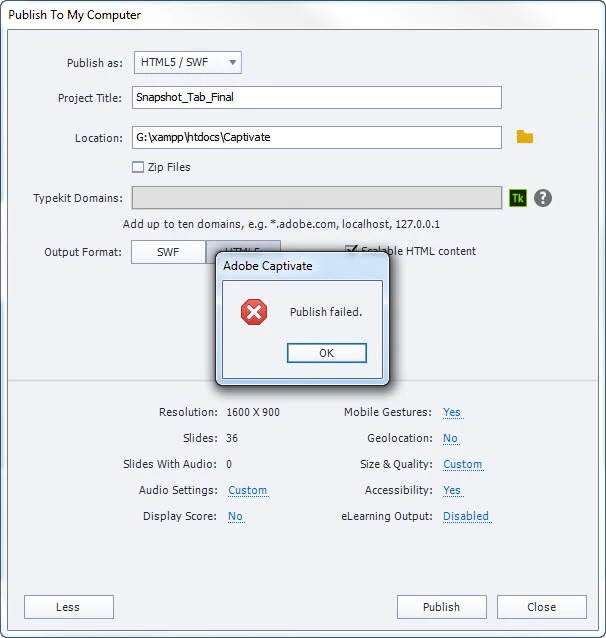
I have recently been getting the following error messages when trying to preview HTML5 in Browser or when Publishing.  It occurs every time. The preview HTML5 in browser does NOT work at all. All I get is the little Publish failed message.  However, when publishing, it gives the messages but still produces a published file set that appears to function properly.  Has anybody else run into this problem?  Everything seems to work, it is just irritating to Not be able to preview the project in the browser.
This topic has been closed for replies.

2 replies

Known Participant
February 28, 2022

I'm having the same issue!  This just started happening - all of the sudden.  I'm not doing anything different than normal.  No outside content, just a software simulation group of slides.  Please help!

RodWard
Community Expert
Community Expert
March 1, 2022

This thread is four years old.


You will need to provide more information about your system OS, Captivate version and, if possible, screenshots of what is happening.

Known Participant
March 1, 2022

Yes, I realized this is an old thread, but this same behaviour just began on my Captivate 2019 version.  I am doing a simulation for an electronic health record software program.  I have done this thousands of times before with no issues.  There are some SWF animations/video embedded within the simulation - as recorded by Captivate 2019.  I am running Windows 10, Captivate 2019 version: 11.5.5.553.


I've tried removing all video/swf animations - and tried again.  It does seem to be related to this particular file, as I can preview other files without simulations.  Then when closing Captivate, the program fails to respond and crashes.


I need this to work as designed.  The SWF files are created when recording the simulation - and scrolling through the software dialog boxes.  (But even after deleting the SWF slides, the simulation will still not preview or publish.


Lilybiri
Legend
November 2, 2018

What is that G-drive?

Participant
November 2, 2018

The G drive is simply my local drive where my "web server" (XAMPP server) is.  It hasn't been an issue since, I had it set up the same way with 2017 and it did not cause this issue, it also didn't seem to cause it on previous 2019 projects.  It seems to have recently (this project) come to light.