


Inspiring
September 10, 2021
Answered

Is it possible to add a gap between 2 quiz

  • September 10, 2021
  • 2 replies
  • 415 views

Hi,


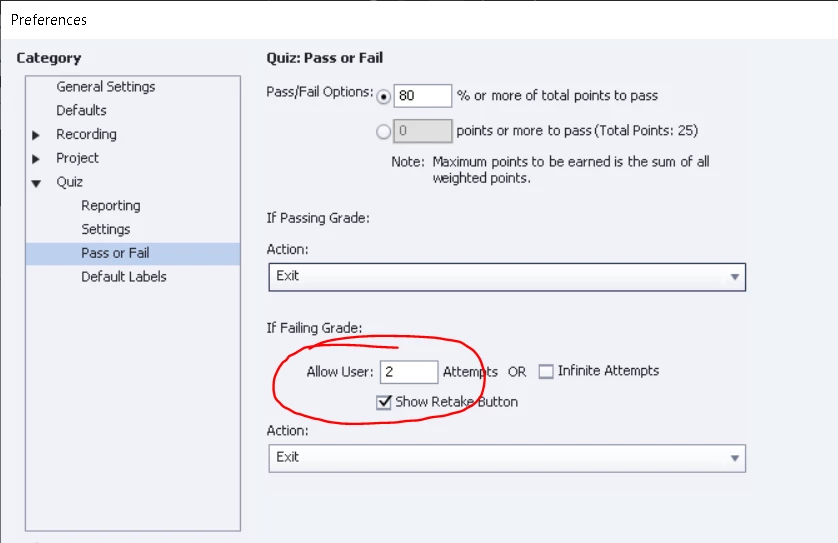
I have created a SCORM file with Captivate that has a quiz at the end. I have set quiz retry attempts to 2, meaning, a person who fails the test, can try one more time. But the person who fails can re-take the test right away. Is there a way to set a one week gap between the first test and the re-test on failing?
 

    This topic has been closed for replies.
    Correct answer RodWard

    If you are not using an LMS, and therefore cannot achieve this using functionality built into the LMS, then Advanced Actions on their own will not do it for you. 


    The issue will be that you need to store data from the learning module somewhere outside the module so that when they reopen it at a later date that data can be retrieved and checked to see if the required time period has expired or not.  The usual way to do this would be using JavaScript to store data in the web browser's Local Storage area.


    If you don't know how to code with JavaScript, you can also achieve Local Storage of data using the CpExtra HTML5 widget:

    https://widgetking.github.io/cpextra/features/variable-prefixes.html#ls-for-local-storage

    2 replies

    Paul Wilson CTDP
    Community Expert
    Community Expert
    September 10, 2021

    You might be able to write some advanced actions that store the date in a variable and compares that with the current date but this isn't a feature built directly in Adobe Captivate. It's more likely your LMS might have some capability in this regards.

    Paul Wilson, CTDP
    Inspiring
    September 10, 2021

    Thank you Paul. I have learnt much about Captivate from your YouTube videos. I'll try to get this done with advanced actions.

    RodWard
    Community Expert
    RodWardCommunity ExpertCorrect answer
    Community Expert
    September 11, 2021

    If you are not using an LMS, and therefore cannot achieve this using functionality built into the LMS, then Advanced Actions on their own will not do it for you. 


    The issue will be that you need to store data from the learning module somewhere outside the module so that when they reopen it at a later date that data can be retrieved and checked to see if the required time period has expired or not.  The usual way to do this would be using JavaScript to store data in the web browser's Local Storage area.


    If you don't know how to code with JavaScript, you can also achieve Local Storage of data using the CpExtra HTML5 widget:

    https://widgetking.github.io/cpextra/features/variable-prefixes.html#ls-for-local-storage

    Lilybiri
    Legend
    September 10, 2021

    This is typically something to set up with rules in the LMS interface, not in Captivate. Since you mention SCORM, I suspect you are using a LMS. Look at its features, it may have another word than 'rule' but it is possible to set up this in any decent LMS.

    Trying to do this from the client side is almost impossible unless you are sure the learner will always use the same system to access the course, and will never clear the browser history and cookies.

    Inspiring
    September 11, 2021

    Thank you for your response Lilybiri. Your response is in the same line as Rodward. I will take this to our SW deptt.

    Lilybiri
    Legend
    September 11, 2021

    Thanks for reading my answer... apparently you needed some confirmation from another expert to believe me. It always hurts, but I am used to it.