

Inspiring
December 16, 2013
Answered

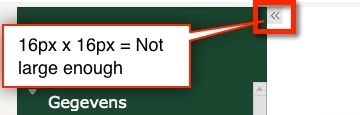
Is it possible to make the TOC expand and collapse icons larger?

  • December 16, 2013
  • 1 reply
  • 2187 views

OR to have the TOC expanding and collapsing by usage of a self made buttons?
This topic has been closed for replies.
Correct answer RodWard

You can use graphics that are slightly taller, but not wider.

If you go to this page and take a look at the example named Supply Chain Management, you will see that I have used a different TOC expand image that is slightly taller:

http://www.infosemantics.com.au/portfolio

I had originally tried to use a larger image but it appears that Captivate limits the width.

You can use the On Success action of a button to assign the value of the cpCmndTOCVisible system variable to 1 or 0 to open or close the TOC.  You can create a toggle action using a Standard or Conditional action to make the same button alternately open or close the TOC each time it is clicked.

1 reply

RodWard
Community Expert
RodWardCommunity ExpertCorrect answer
Community Expert
December 16, 2013

You can use graphics that are slightly taller, but not wider.

If you go to this page and take a look at the example named Supply Chain Management, you will see that I have used a different TOC expand image that is slightly taller:

http://www.infosemantics.com.au/portfolio

I had originally tried to use a larger image but it appears that Captivate limits the width.

You can use the On Success action of a button to assign the value of the cpCmndTOCVisible system variable to 1 or 0 to open or close the TOC.  You can create a toggle action using a Standard or Conditional action to make the same button alternately open or close the TOC each time it is clicked.

Inspiring
December 16, 2013

Hi Rod,

Thanks for the fast response

When I output to HTML5 I can change the size of the icons in realtime using Firebug, but can't find the CSS rule that limits the width of the TOC icons to 16 px in the Published files?

Btw, Love your Guide to Advanced Actions.

RodWard
Community Expert
Community Expert
December 16, 2013

I wasn't referring to HTML5.  The limitation I experienced was on the Captivate side when it came to changing the icon graphics.  No matter what I did, the image I inserted always seemed to be displayed at the same width.
