
Known Participant
October 27, 2016
Answered

Is it possible to turn an image after a motion path?

  • October 27, 2016
  • 2 replies
  • 269 views

Hello, 

I'd like to add some images to a slide, one at a time. After an image appears, I'd like to use the motion path to move it to the side as the next image appears. I am hoping to stack 3-4 images on the side when done but it would be great if there was a way to turn (or twist) some of the images. Is this possible in Captivate 9?

To better describe the post-motion path action I am looking for, think about being in edit mode and selecting an image. There is a little circle above the image, just over the center and with the mouse, you can turn or twist the image. This is what I'd like to do.

Thank you!
    This topic has been closed for replies.
    Correct answer Lilybiri

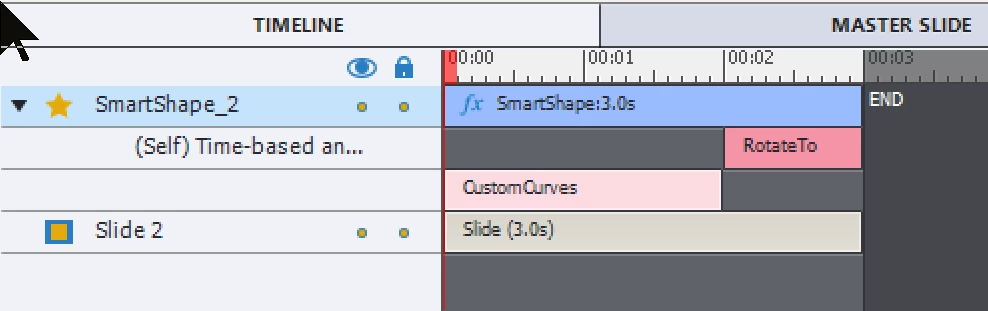
    You can combine effects on the timeline: put a Rotate to effect after the motion effect.

    2 replies

    RodWard
    Community Expert
    Community Expert
    October 28, 2016

    You're going to HATE the way motion effects work once you've tried doing this because they move in a RELATIVE way rather than allowing you to specify an ABSOLUTE X and Y coordinate as the destination for each effect.  This makes it a complete pain trying to make the objects move accurately to a given point where they all line up at the end.

    Please lot an enhancement request for Adobe to improve the way Effect positioning works.

    Lilybiri
    Legend
    October 28, 2016

    I agree about not being able to give the exact coordinates, although I don't think the path being relative instead of absolute is always a negative feature. At this moment, I'm using the Guides, which you can place at a specific point (defined by coordinates) to make it easier to snap to a specific location. See example in: Guides Rule! - Captivate blog

    I must have misunderstood this question? I thought it was about having a rotate effect after a motion effect, not about motion paths themselves.

    Lilybiri
    LilybiriCorrect answer
    Legend
    October 27, 2016

    You can combine effects on the timeline: put a Rotate to effect after the motion effect.

    Known Participant
    October 28, 2016

    It worked, thank you, Lilybiri!

    And thank you for your input, too, Rod, but for my needs, I don't need to be that specific.

    i appreciate the help!