
kathrynm83107044
Participating Frequently
October 4, 2017
Question

Is there a way to execute all decision blocks in an Advanced Action?

  • October 4, 2017
  • 1 reply
  • 847 views

Hello all,

Using Captivate 2017...

I may be trying to do something impossible... I am attempting to simulate a key pad (with digits 0 through 9 - but my test is digits 0 through 3), so that a user can click four digits, then get feedback..  Basically:

  • There are 4 "positions" of buttons, A through D, each associated with a variable, "NetIDKeyA", "NetIDKeyB", etc.
  • A user will "press" the digit key (click the button), and that will set a variable value; so on Layer A, pressing 0 will set variable to literal value "A0", etc.
  • An audio file plays after each button press for positions A, B and C ("zero", "one", etc.), the position layer is hidden, and the next position layer is shown. That part was easily done with advanced actions on button presses:
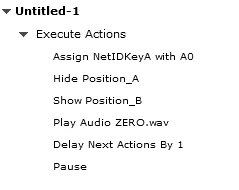
  • Once four digits have been entered, the users are supposed to hear a confirmation consisting of the audio file "Net" followed by the audio files for each digit, in order... I've attempted to do that with the following advanced action that is triggered by clicking a button on the Position D layer. So the script
    • plays the audio for the key just pressed - for D0, it's "zero"
    • plays the audio "Net"
    • would ideally play the Position A audio, delay, then play Position B audio, delay, then play Position C audio, then play the Position D audio (I combined the position C and D audio into the Cx decision blocks.

Pressing the D position digit appears to execute only the D0 decision block.  Is there a way to force Captivate to run through all the decision blocks?

(sorry for the long post)

Thanks!

Kathryn

This topic has been closed for replies.

1 reply

Lilybiri
Legend
October 4, 2017

What is the link between the subject and the question? Captivate always evaluates all decisions in an advanced (or shared) action, in the same sequence: from left to right. Which events are used for the actions? Maybe screenshots could help.

Many years ago I created this use case for a keypad. It would now be a lot easier with the added functionality for advanced actions:

Create a Keypad-Simulation using Advanced Actions - Captivate blog

Maybe I should recreate this example in CP2017 -  if I was not so busy.

kathrynm83107044
Participating Frequently
October 4, 2017

Hi Lilybiri,

First, thank you for answering - and thank you for all the blog posts and forum answers you contribute.  I have learned a tremendous amount from you. :-)

As for this, I was assuming that because it seems to be only performing the first decision block that there was some kind of "stop when a decision block results in an action" logic.  If that's not the case then I'm doing something wrong.  (not a big surprise).

I took a close look at your example, too.  I used the same basic idea, with a click of each individual button (P_A_0, P_A_1, etc. for layer/position A) triggering an action that sets a variable (NetIDA, NetIDB, etc), except instead of using a slide for each digit, i used four groups of buttons and the Hide/Show functionality.  The piece of equipment I'm trying to simulate does not have an "Enter" or similar button to trigger a final event, nor is there a "correct" sequence.

So, the workflow to enter an ID of "1230" would go like this (note, I'm only showing the buttons to make the images smaller; i've also colour-coded the buttons and labeled them with their object name). Action summaries are next to the screenshots. :

1. Press the "`1" key, triggering action PA_1.

2. Press the "2" key, triggering action PB_2.

3.  Press the "3" key, triggering action PC_3

4.  Press the "0" key, triggering action PD_0 (the multi-block action above, in original post).

Everything works, right up to the D0 decision block of action PD_0... at least, after pressing button D_0, the audio file "ZERO" plays, then there is a pause, then the audio file "NET" plays. Then... nothing.  I made the slide 100 secs duration, with pauses at 99 sec, so I know I'm not being tripped up by an early pause.  I just can't see where I've gone wrong :-(

Any input greatly appreciated!

Thanks.

Lilybiri
Legend
October 4, 2017

Sorry,  too much details are lacking. No way to understand what you want. What is triggering that conditional action with all those decisions? I think that Position.... are groups? You do have the groups in exactly the same position?

Why do you use the Pause command, it has no sense at all. I suppose that the buttons have a pausing point (all at the same position), which means that the playhead is not released, the pause is not necessary at all. Same for the Delay command: it has no sense. Did you read my blog post about Pausing the Timeline?  I suspect that you think that the audio clip started with Play audio is paused by the pausing point, but that is not the case at all. Nothing can stop 'Play Audio', not a Pause command, nor a pausing point. That is not solving our original question but those are superfluous commands (Delay +Pause).