
Participant
May 31, 2016
Answered

Is there a way to re-size Effects in CP9?

  • May 31, 2016
  • 2 replies
  • 295 views

Hello,

I am using Captivate 9 and would like to use the Effect > Motion Path > Circle for the project I am working on; however, when I select the animation the motion path is very small on my work-space. Is there a way to easily enlarge the motion path without compromising the circle? I've tried enlarging the circle manually but the lines warp easily. I've tried clicking on the motion circle, holding down Shift, and dragging the circle out but that does not work.

Any ideas? - Thank you!
This topic has been closed for replies.
Correct answer Lilybiri

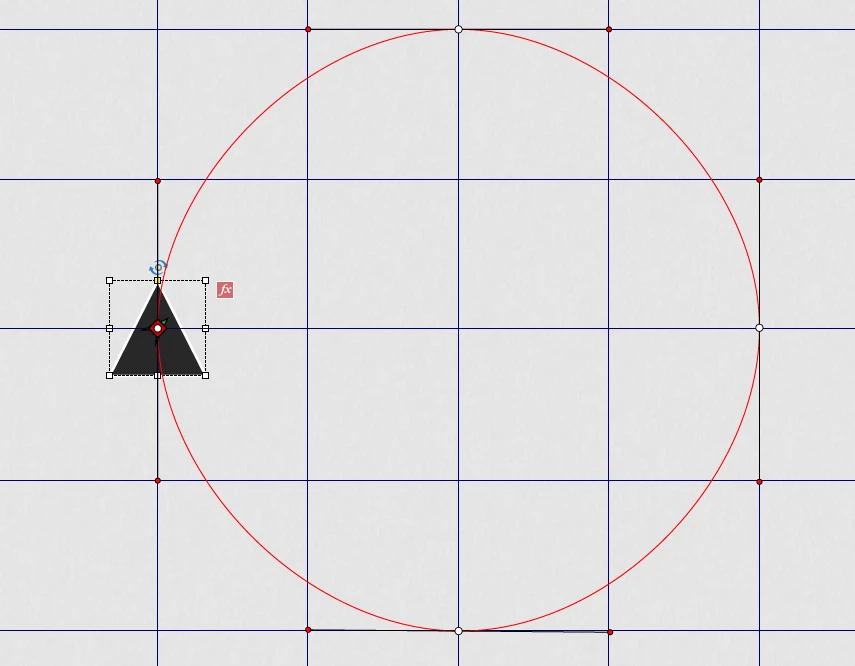
Are you on the last version 9.0.1.320? I would recommend using Guides dragged out of the new Rulers. Use two vertical and two horizontal Guides that are creating a square template. You can drag the four points of the circular motion path to snap to the guides. Just be sure that the starting point, which will be the left most point of the circular path, remains in the same location.

Here is a screenshot of what I try to explain, the original circle was much smaller, I edited it with the guides, both the points and the tangent points (would be so much easier if snap was working for those points, and shift for constraining movements):

2 replies

Captiv8r
Legend
May 31, 2016

Hi there

See if the video linked below helps you achieve that goal.

Click here to view

Cheers... Rick

Lilybiri
LilybiriCorrect answer
Legend
May 31, 2016

Are you on the last version 9.0.1.320? I would recommend using Guides dragged out of the new Rulers. Use two vertical and two horizontal Guides that are creating a square template. You can drag the four points of the circular motion path to snap to the guides. Just be sure that the starting point, which will be the left most point of the circular path, remains in the same location.

Here is a screenshot of what I try to explain, the original circle was much smaller, I edited it with the guides, both the points and the tangent points (would be so much easier if snap was working for those points, and shift for constraining movements):