
Participant
February 29, 2024
Question

Is there a way to set "cpquizinfopointsscored" above zero before any quiz questions?

  • February 29, 2024
  • 1 reply
  • 216 views

I have a project in Adobe Captivate Classic (11.8) where various actions trigger based on the learner's score. The higher the score, the more hearts display on the screen, etc. Each quiz question has 10 points for correct, and a 10-point penalty for incorrect. We want to start this score at 60, and if it gets down to zero through too many penalties, it triggers a failure slide. However, the only variable I can find that I could use is cpquizinfopointsscored, which starts at zero, since they haven't scored any points yet.


I tried creating a click box on the opening slide, set it as "Add to quiz" and "add to total" with the value set to 60, but it doesn't affect the pointsscored variable at all. (See image)
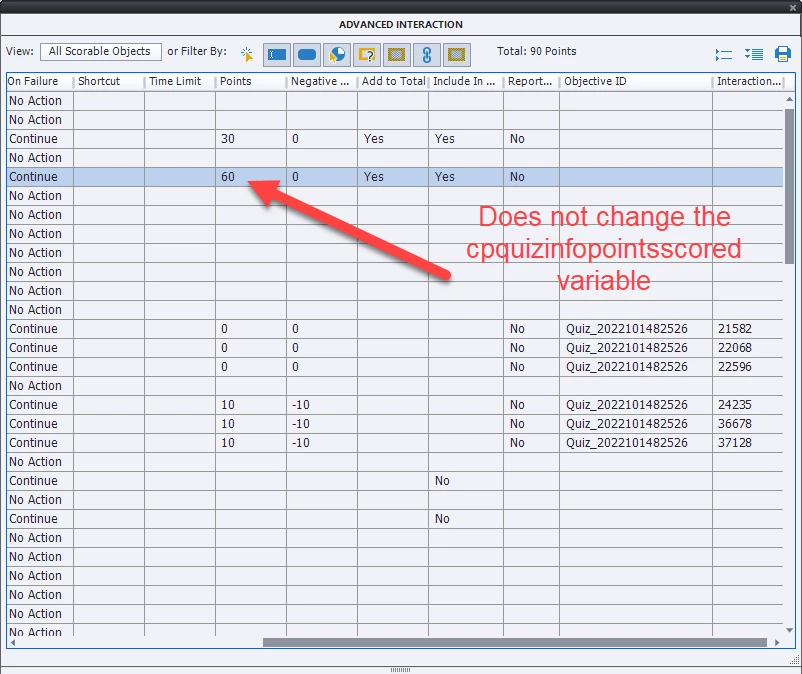
 

I'm toying with leaving it at zero to start, and if the score gets down to -60, it triggers the failure slide, but LMSs won't accommodate negative scores. Any help would be appreciated.

This topic has been closed for replies.

1 reply

Lilybiri
Legend
February 29, 2024

Careful, all variable are case sensitive! It is cpQuizInfoPointsscored.

With the exception of the category Movie Control all system variables are read only.  Have a look at a complete description:

https://blog.lilybiri.com/using-quizzing-system-variables

You may be able to change them by JS but I use CpExtra widget (InfoSemantics - Australia) for that purpose ad many other features.

But you could use that system variable in combination with a user variable.  Create a variable v_MyScore which you start by setting its value at the start at 60:

  Assign v_MyScore with 60

Use the actions on Success/Last Attempt to change this user variable and use it for your conditional decision to navigate to the failure slide when it gets to zero.

I don't know if you use a LMS. The score slide will still use the system quizzing variables to transfer the data to the LMS.

Participant
February 29, 2024

I had initally planned on using a user variable just called "score" and changing that, but then I can't use quiz slides, at least as far as I can tell, since quiz slides only affect points in the quiz score. I would have to build my own custom slides to use this, correct?

Lilybiri
Legend
February 29, 2024

I don't understand why you cannot use quiz slides?  I have created multiple workflows where the result of an answered quiz slide is stored both in the system quizzing variable AND in a user variable deducted from that variable. Of course you'll need some advanced (or shared) actions. How many attempts do you preview on question level? How many on quiz level?  With your setup using penalty for wrong answer you don't have to wonder about the value of the system variable cpQuizInfoPointsscored. But you can have both a Success action and a Last Attempt action. For success action it could be:

   Increment v_MyScore by 10

   Continue or Go to Next Slide

For Last Attempt you'll need two decisions:

    1. Decrement v_MyScore by 10

     2. IF v_MyScore is equal to 0

               Jump to slide....
          ELSE
               Continue or Go to Next Slide


Since you always use 10pt for score/penalty you don't need to use another operator than '... is equal to'. I don't know exactly how you did set up the progress using the hearts, that part in the Advanced Interaction panel for the actions on the quiz is not visible in your screenshot. So, this will need some editing.