


Participating Frequently
April 5, 2017
Question

Is there an easier way to do this? (Duplicating and remapping custom quiz slides)

  • April 5, 2017
  • 2 replies
  • 264 views

Hey all. I am attempting to make a multiple choice-type quiz but with shapes instead of text. I tried to do this through the default quiz slides, but it didn't really work, so after a long time of trial and error, I figured out a way to make it through a custom slide. I thought I could streamline the activity and make the actions "shared," thereby making it efficient, but its still taking me a lot of time.

Every time I duplicate the custom slide, I have to remap the answers (no big deal), but in doing so I need to remap the parameters in the shared action, which is taking a long time. And for every duplicate, there's a new number being added to the custom shape, which means eventually I'm going to have a ton of these when all is said and done.

The quiz looks like this:
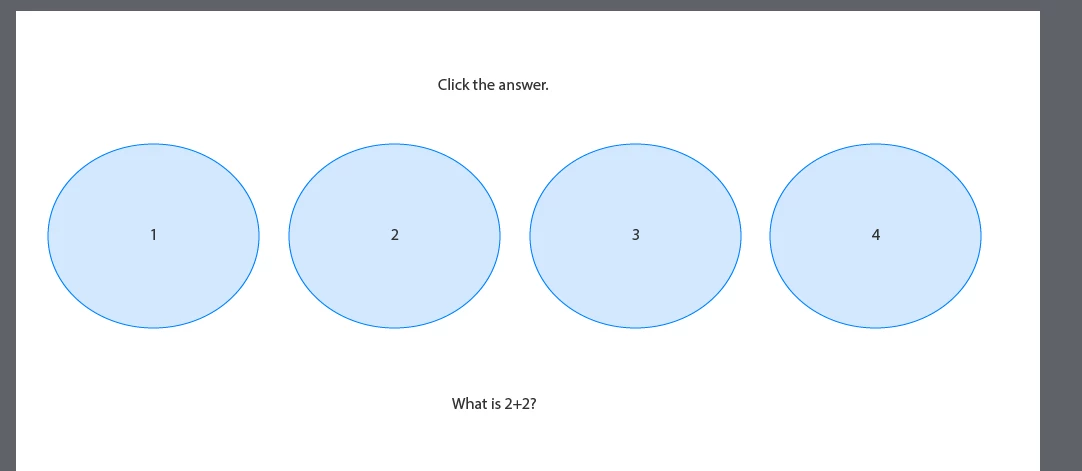
Except there are 5 circles, not 4.

When a user clicks a shape, it brings up the Shared Action "Incorrect" or "Correct." The "Incorrect" action:

- Disables all buttons

- Shows "Incorrect" group that has the Next button

Likewise, the "Correct" action:

- Disables all buttons

- Shows "Correct" group with the Next button

And they look like this:
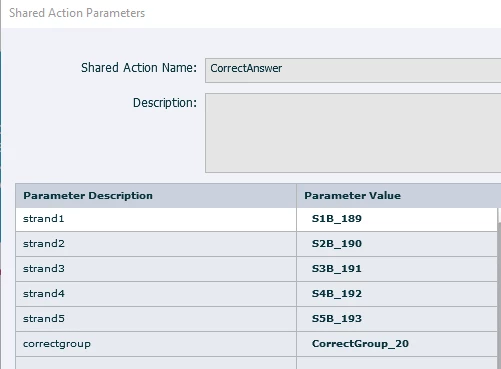
The problem is that the parameters need to be changed every time, and I need to click the "value" field like 500 times for it to recognize that I want to type something (if it doesn't automatically misclick something for me, in which case, another 500 times). The shapes are growing in number and I was hoping to have like 20 of these kind of questions. Every time I duplicate the slide adds more time to changing that parameter, and eventually I'll need to scroll to select the right shape.

I'm not trying to complain or sound lazy, it just doesn't seem like I'm seeing the "obvious" way here. It's such a simple quiz interaction. Why is it taking so long? Is there another way to do this?

Thanks for your help.

    This topic has been closed for replies.

    2 replies

    Participating Frequently
    April 6, 2017

    Question:  is each slide the same? I mean is each slide the same five circles with the answers in them with a question below? 

    Lilybiri
    Legend
    April 5, 2017

    I know perfectly what you mean. This is too cumbersome.

    There is no way to disable a group of interactive objects (one of my feature requests, will probably never make it since too few people are asking for it). Another of my requests is to be able to indicate which parameters have to be fixed (as is possible for variables and literals) but have the same doubts about that request.

    Some possible improvements: although I am aware about the advantages of shared actions over advanced actions, in this case duplicating the advanced action and editing that could be quicker. Another idea: instead of disabling, hide the buttons because you can hide and show a group.

    A strong recommendation: please set up a good labeling system! Do never use generic names for objects you'll have to use as parameters in a shared actions or advanced actions.The filtering  in dropdown lists will speed up the process a lot if you choose better names.

    Participating Frequently
    April 5, 2017

    Thanks so much Lilybiri! I'm glad I was able to make my point without coming across as... entitled to easier methods

    Disabling a group would have been a God send, haha! Or - having shapes linked to parameters, instead of parameters linked to shapes. So that when I do duplicate the slide, the shape itself is still "strand1" even though its name "S1B" was changed to "S1B_98." That would save some time.

    I noticed, and am grateful, that I do not seem to need to change the parameters for objects that aren't being adjusted. For example, duplicating Slide 1 where the correct answer was "Button A," and changing "Button A" to "Incorrect" and "Button B" is "Correct" - I don't seem to need to touch Buttons C, D, and E. At least, I don't think so.

    How would you mean the labeling system? I have the buttons labeled S1B(utton), S2B, S3B, etc. So I type in "S1" and then select which variation the duplicated slide created. I'd otherwise have to rename each of the shapes every time I duplicate. I wonder which would end up taking the least amount of time...

    Lilybiri
    Legend
    April 5, 2017

    Be careful: each item needs to have a unique ID, you seem to tell that it is not the case?

    I don't understand what you mean  'having shapes linked to parameters instead of....'. Parameters are always objects or groups. Some parameters are compulsory, the objects/groups. Other parameters are 'candidate' which is the case for variables and literals. For them you can choose whether they'll be parameters or not. That is what I would like for all compulsory parameters as well.

    I have no idea how this is set up, but can you use some objects for a sequence of slides? In that case you can time them for the rest of the project, they'll have a unique ID and you don't have to change the parameters. You can hide them when you don't need them anymore. For interactive objects this is only possible for shape buttons.