



Question
Is this a bug or a feature? ZOOM not allowed under certain conditions - Captivate 2019
After setting the zoom level to Best Fit using the Keyboard shortcut Ctrl+0, I can no longer zoom in and out using the shortcuts Ctrl +/Ctrl -
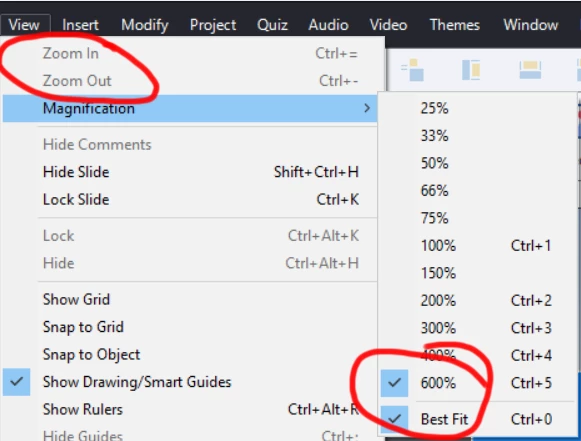
Furthermore, the Zoom In and Zoom Out options in the Zoom menu are disabled.
When I go to the Magnification submenu, more interestingness appears. Even thought Best Fit is checked. The zoom level of 600% is also checked.
I have to select 100% and then I can zoom in and out.
So basically, if I zoom to best fit. I have to zoom to 100% before I can zoom in/out. Is that normal for other people? Is it a bug? It doesn't work the way I would expect it to.
 AdChoices