


Participant
March 6, 2023
Question

Issue adding bookmarks to slide video

  • March 6, 2023
  • 2 replies
  • 231 views

Anyone else come across an issue where Captivate crashes when trying to add a bookmark? 
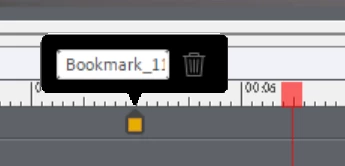


I've been able to add the bookmark here but I'm now unable to move in the timeline or to another slide without the software having a meltdown. 


If I click the trash icon, my bookmark is removed and I can navigate around the software okay again, as if when I add the bookmark, the software stops responding. 


Appreciate any support with this, 


Thanks, 

Paul 🙂 


    This topic has been closed for replies.

    2 replies

    RodWard
    Community Expert
    Community Expert
    March 7, 2023

    It is possible that when you try to create the bookmark a modal dialog has opened that you cannot see, and that is making it appear as if Captivate is crashing when in fact the problem is simply that you cannot see the dialog to interact with it.  This sometimes happens when you have been using multiple monitors.

    Try this:  Try creating the bookmark and when Captivate becomes unresponsive, hit the ESCAPE key on your keyboard.  If Captivate then becomes responsive again, you know the problem is related to that modal dialog you cannot see.  


    If that turns out to be the issue, you will need to hook up to another monitor again to try and see the dialog so that you can move it to the same window where Captivate is visible.

    Lilybiri
    Legend
    March 6, 2023

    The name CP2019 covers so many releases, main as well as patch releases, that it is important to mention the full version number. You find that number under Help, About Captivate. The most recent version was released a couple of weeks ago, 11.8.1. I have another system which still runs 11.5.5.553. Mention also which OS you are using, please. I can test on both 11.8.1 and 11.5.5.  I have created several interactive videos.