
Participant
May 31, 2017
Question

Issue: Publish to YouTube
  • May 31, 2017
  • 1 reply
  • 400 views

Hey there,

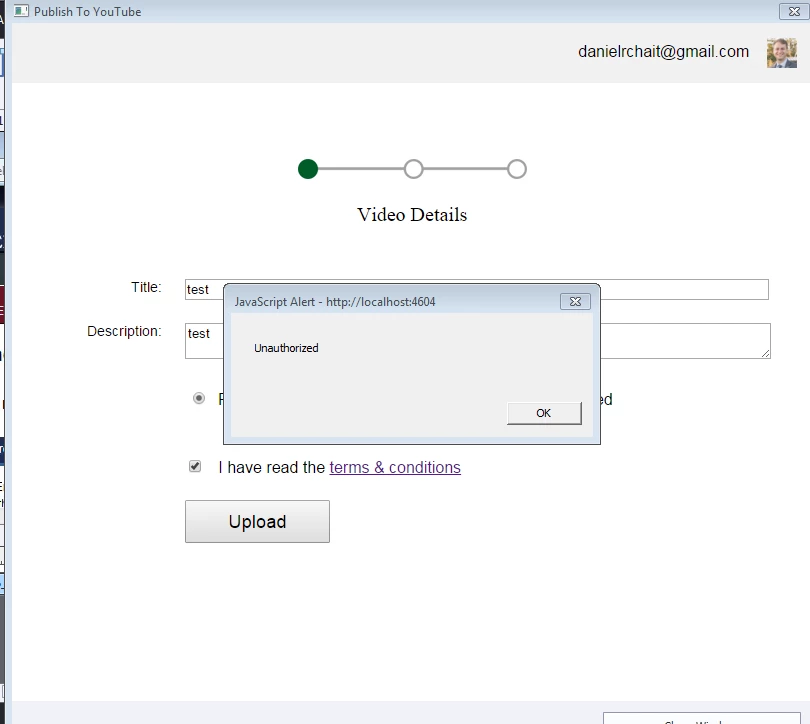
So I am trying to publish a relatively short video demo from Captivate to YouTube. I'm signed in to my YouTube account, set to public view. When I click upload after typing in a title and description, I am getting an error message (also seen in image below): "JavaScript Alert - http://localhost:4604 Unauthorized."

What does this mean? Why can't I publish the video?

Thanks for all of your help!

    This topic has been closed for replies.

    1 reply

    shadenm1906
    Participant
    July 22, 2019

    Hi,

    I had a similar issue last week and today I was able to correct the issue in Windows 10 and Captivate 9.0 by following these steps:

    1 - I renamed the Captivate file in my user account (C:\Users\YOURUSER ACCOUNT\AppData\Local\Adobe\Captivate 9.0) to C:\Users\YOURUSER ACCOUNT\AppData\Local\Adobe\Captivate 9.0(old)

    2 - Uninstalled in Add or Remove Programs then selected remove preferences check box next to uninstall

    3 - Reinstalled

    4 - Restarted my computer

    It worked.

    All the best!

    LuisXIV
    Participating Frequently
    July 23, 2019

    Hello shadenm,

    Take a look at some of Paul Wilson video where he talk about uploading to youtube.

    You can find he channel in YouTube.

    Luis