Participating Frequently
October 7, 2019
Question

Issue with drag and drop in Captivate 2017 (10.0.1.285)

  • October 7, 2019
  • 4 replies
  • 626 views

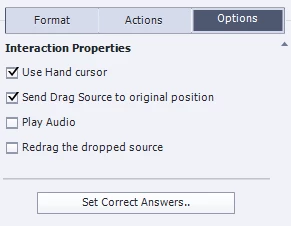
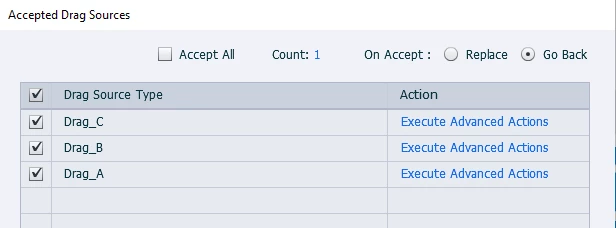
Hi. I have created D&D activity. The requirement is that users should be able to move their choices around from one location to another prior to hitting the submit button. I selected Replace option in Accepted Drag Sources. When we checked in HTML output it is observed that the drag object becomes invisible after certain instances of replacing when dropped on target. So for time being I have kept Go Back option.

I have used custom Submit button. It has 2 attempts. It has 2 different incorrect feedbacks. For that I created 2 slides. On first incorrect Reset button appears. On clicking Reset button (custom button) user jumps to next slide. On incorrect attepmt it displays another incorrect feedback. I have duplicated the slide before implementing D&D functionality.  

Can you please let me know what could be the problem. 


Thanks in Advance.

    This topic has been closed for replies.

    4 replies

    ShalakaSMAuthor
    Participating Frequently
    October 10, 2019

    Hi all. Thank you very much for your support. I created the activity again from scratch and it is working fine now.

    Dirlo
    Inspiring
    October 10, 2019
    Great !... Thanks for this last report !... Happy captivating !...
    Stagprime2687219
    Legend
    October 7, 2019

    Do you happen to have the snap behavior set to back?


    ShalakaSMAuthor
    Participating Frequently
    October 7, 2019
    No. The thing is it works fine for some time and suddenly disappears. I have total 3 drop and 3 drag objects. It happens with any one of the 3 drop targets.
    Dirlo
    Inspiring
    October 7, 2019
    Maybe this is linked with the timeline ? Check your objects are scheduled to display during all the slide...
    Dirlo
    Inspiring
    October 7, 2019

    ...

    Hello !...

    You should try these options :

    - On accepted drag source, select "Replace"

    - On the options , select "Redrag the dropped source"

    And for your feedbacks, I advise you to create them on the same slide. (You can use a TEB - or a smartshape - with 3 multiple shapes, normal one is empty (and invisible so), one for good, and 2 for wrong, with your incorrect feedbacks. And your trigger the changes of the shapes on the action on the "accepted drag source" panel, or/and with the submit button).

    Happy Captivating !...

    ...

    ShalakaSMAuthor
    Participating Frequently
    October 7, 2019
    Hi. Thanks for quick response. I tried with "Redrag the dropped source" but same problem mentioned above. I have done many modifications. The submit will not enable unless activity is attempted. For correct drop the value of variable is set to 1 and 2 for incorrect. For 2 different incorrect feedback I chose to split the activity.
    Dirlo
    Inspiring
    October 7, 2019

    Hum... Not so easy to help you without the sources... And the only way to share it with us is in the https://elearning.adobe.com/blogs/... But it takes time before it appears. Try to share here more screenshots of your D&D slides, so we can understand clearly what you want ?

    Stagprime2687219
    Legend
    October 7, 2019

    Related to going invisible...

    Can you verify that all of your drag sources are objects at a higher level than the drop targets?

    ShalakaSMAuthor
    Participating Frequently
    October 7, 2019
    Hi. Thanks for prompt response. Yes the drag objects are on top. Is there any way I can share source file? One more thing I would like to add is that the object which disappears comes back to its original position and is visible after dropping another drag object.