
Participating Frequently
June 27, 2018
Answered

Issue with Software Simulation in Captivate 2017 (10)

  • June 27, 2018
  • 1 reply
  • 297 views

Since I have started using CP 17, my mouse movements are not recording in software simulation. I have to manually add the mouse to each slide and then adjust it's location. I have mouse location and movement box checked, but still it's not picking up the mouse movement.
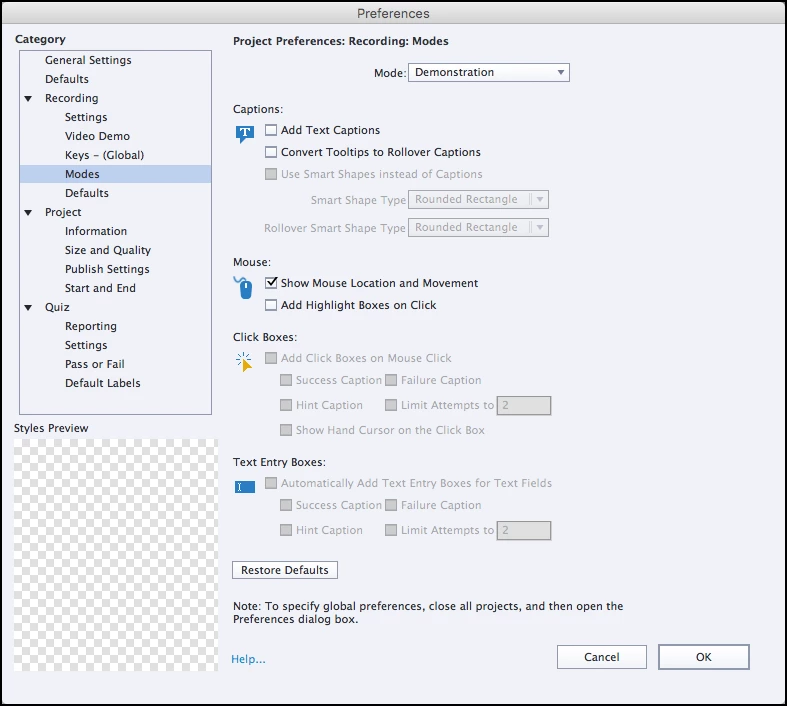
Thank you in advance for any suggestion!

    This topic has been closed for replies.
    Correct answer Lilybiri

    I edited your title, because it is Captivate 10 at this moment, but it is also indicated as CP2017. Vey confusing, I know.

    Are you on the most recent version which is 10.0.1.285? I see that you edited the setup for Demonstration mode, is this also happening when you use the default setup for this mode? Which screen are you using: retina or not? Do you Run Captivate as Admininstrator? That is important especially for recording.

    1 reply

    Lilybiri
    LilybiriCorrect answer
    Legend
    June 27, 2018

    I edited your title, because it is Captivate 10 at this moment, but it is also indicated as CP2017. Vey confusing, I know.

    Are you on the most recent version which is 10.0.1.285? I see that you edited the setup for Demonstration mode, is this also happening when you use the default setup for this mode? Which screen are you using: retina or not? Do you Run Captivate as Admininstrator? That is important especially for recording.

    Participating Frequently
    June 27, 2018

    Thanks for the correction

    I was on version 10.0.0.192 and updated it and now it works fine in the latest version. Thank you for your help!

    Lesson learned, check for updates more often!