
Participant
January 30, 2026
Question

Issues with Captivate's ToC - Unable to rearrange or create groups

  • January 30, 2026
  • 1 reply
  • 29 views

Hello,


I’m experiencing an issue in Captivate (Not Classic Captivate) when trying to rearrange and group slides within the Table of Content (ToC) setting menu. The slides are sticking to my mouse when trying to drag or click to move. Additionally, this prevents me from grouping slides together in groups. 


Course I am working on has several sections that I ideally want to group together in the ToC for easy user access. Updated to 13.0.0 version last month when this issue first appeared. It is affecting both brand new and old courses. 


Only thing I can do is “hide” slides and rearrange via the arrows. Unable to group or create any levels due to the bug.


Attached is a screenshot and a short video showing the error.
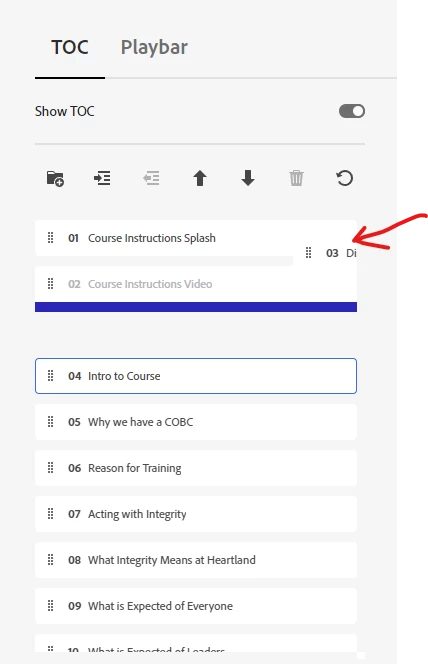
Slide 3 won't release from mouse and cannot be rearranged or grouped.


    1 reply

    viswanathm2165140
    Participant
    March 23, 2026

    We are bale perform drag and drop / grouping scenario of slides in TOC  in 13.0.0  version as shown in the attachment and it should work . (User should drag and drop the slide in matching with the blue indicator line firmly). 


    Participant
    March 23, 2026

    Unfortunately, that functionality is not working for me. I am on v13. One of two things happens when attempting to rearrange the ToC.

    1. The slide sticks to the mouse and will not drop on the blue line
    2. Crashes the entire program

     Lately it has been mainly doing number 2 and crashes Captivate. Learn my lesson to always save before attempting to mess with any of the ToC or playbar settings.