



Dirlo
Inspiring
May 26, 2021
Answered

Javascript - Add many numbers (Variables)

  • May 26, 2021
  • 1 reply
  • 1872 views

...

Hello !...

I'm working on a game project and I have a strange issue...

I'm collecting numbers in TEB (and saved them as variables named "D1_1", "D1_2", ... , "D1_6")

And I want to add these 6 variables, the result would be another variable ("Total_1")...

(Of course I can add them using the Captivate's Expression action but it would add more variables, need 5 actions... So I wanted to use Javascript !...)

And to add these 6 variables with Javascript it would need  just a line of code :

Total_1 = D1_1 + D1_2 + D1_3 + D1_4 + D1_5 + D1_6;

After having a problem (my variables considered as string and not as numbers), I looked in Js ressources on Internet and found that I have to add :

Number(Total_1);

And it seems to be ok :
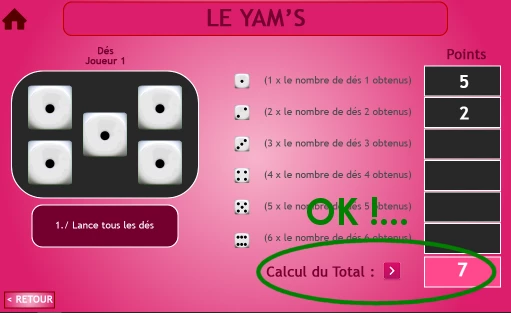
 

But If I let one TEB without answer, the same problem (string and number) occurs :
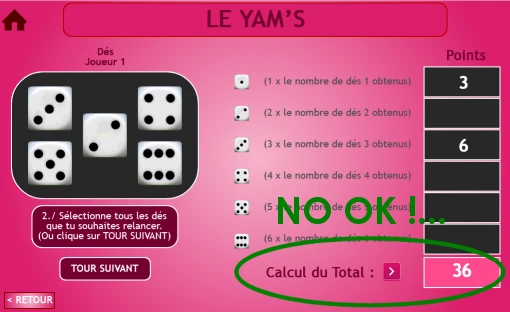


So... I need your help !

(I already found a solution by adding the default text of "0" in the TEB... But I would  prefer that the TEBs were cleared...)

Thanks in advance !...

😉

...

Edit : I forget to precise that I affect all these variables with "0" when entering the slide...

...

    This topic has been closed for replies.
    Correct answer Stagprime2687219

    Here is a thought. Without examining more closely, this may take care of things for you.

    You can also create a number by performing a math function. I have often done this quick hack to ensure that I have numbers. Just multiply each value by 1 so that the value does not change but it will become a number. Then you can prevent the concatenation.


    varTotal = (varA*1)+(varB*1)+(varC*1)+(varD*1)...etc

    1 reply

    Stagprime2687219
    Stagprime2687219Correct answer
    Legend
    May 26, 2021

    Here is a thought. Without examining more closely, this may take care of things for you.

    You can also create a number by performing a math function. I have often done this quick hack to ensure that I have numbers. Just multiply each value by 1 so that the value does not change but it will become a number. Then you can prevent the concatenation.


    varTotal = (varA*1)+(varB*1)+(varC*1)+(varD*1)...etc

    Dirlo
    DirloAuthor
    Inspiring
    May 26, 2021

    ...

    Works perfectly !...

    Thanks Greg !...

    😉

    ...