justinm53961168
Inspiring
May 5, 2016
Answered

JS help (random tip)

  • May 5, 2016
  • 2 replies
  • 283 views

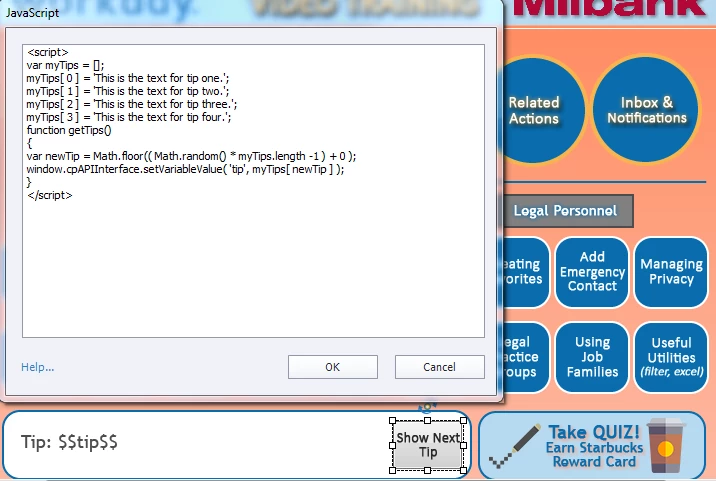
I'm trying to generate a random tip when I click the 'Show Next Tip' below...

but can't get it to work:(

I'm launching the JavaScript from the button.

From the code and variables, do you see anything wrong?
    This topic has been closed for replies.
    Correct answer TLCMediaDesign

    He marked it correct in another thread Lieve. He was using the script tags and never calling the function as it was meant to be external.

    Both my revised code and your anonymous function seem to work well.

    2 replies

    Lilybiri
    Legend
    May 5, 2016

    The random number that you are generating should be the index in the array, not just a standalone number.

    You do not run the function, and it is not returning a result. I just tried this out with a console.log, not yet in Captivate, to fill the variable 'tip'

         getTip = function() {

                var newTip;

                newTip = tips[Math.floor(Math.random()*tips.length)];

           return newTip;

      };

      var tips = [];

        tips[0] = "Eerste tip";

        tips[1] = "Tweede tip";

        tips[2] = "Derde tip";

        tips[3] = "Vierde tip";

    tip = getTip();

    console.log (tip);

    Moreover, I suspect you did put this in the JS window in Captivate, which is not what David told you to do. I'm not sure this will work.

    You could put the definition and the function in the JS file that will be included when published, and run the function from the button.

    I hope TLCMediaDesign will pop in and clarify

    Lilybiri
    Legend
    May 5, 2016

    OK, David used 'newTip' to create the random number and put it later as index for the array.

    But you have to use the correct name for the variable as well: in your screenshot it is 'tip', for David it is 'showTips'.

    TLCMediaDesign
    TLCMediaDesignCorrect answer
    Inspiring
    May 5, 2016

    He marked it correct in another thread Lieve. He was using the script tags and never calling the function as it was meant to be external.

    Both my revised code and your anonymous function seem to work well.

    TLCMediaDesign
    Inspiring
    May 5, 2016

    Yes, you cannot have the <script> </script> tags in the JavaScript window.

    You would also need to remove the function.

    var myTips = [];

    myTips[ 0 ] = 'This is the text for tip one.';  
    myTips[ 1 ] = 'This is the text for tip two.';
    myTips[ 2 ] = 'This is the text for tip three.';
    myTips[ 3 ] = 'This is the text for tip four.';

    var newTip = Math.floor(( Math.random() * myTips.length - 1 ) + 0 );
    window.cpAPIInterface.setVariableValue( 'showTips', myTips[ newTip ] );
