
Inspiring
June 14, 2019
Question

JS vs Advanced/Shared Action

  • June 14, 2019
  • 2 replies
  • 840 views

Hi there

I would like to hear opinions about the advantages and disadvantages of using JS vs Advanced/Shared actions.

It is not about Shared vs Advanced where Shared should always be preferred when possible.

It is about the implications of using JS instead of Advanced actions.

For me, it is easier to use the JS since I can type faster but would be good to hear thoughts. I am using a number of commands like

cp.changeState

cp.SubmitInteractions

cp.enable/disable

cp.hide/show

cp.clickHandler

I know JS is quite comprehensive but what other "basic" ones are there?


Thanks in advance.Bobby

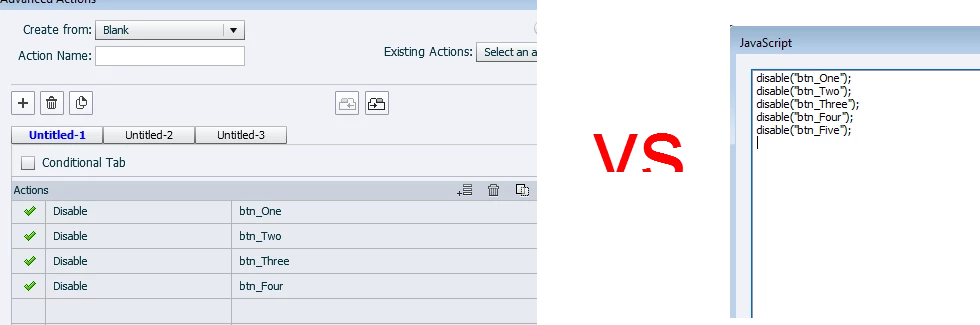
PS. In other words, why would I use the left one and not the right one?
    This topic has been closed for replies.

    2 replies

    Stagprime2687219
    Legend
    June 14, 2019

    I am like you.

    I used to use advanced actions exclusively but then I happened across a project that was much more complex. While I believe the end result would be achievable using only advanced actions - I felt it simply became too cumbersome with all the clicking, naming, conditional tab checkboxing, and the thing that constantly drove me nuts which was when I wanted to tweak something related to a variable and other parts of the statement would force me to click through and update them.

    Everything was so disjointed and spread across different tabs that it became difficult to "see" what was happening.

    I found that neatly placing my commands in the javascript window was not only faster but easier to follow and update. Now if they can just make that window so we can resize it.

    I work for a private company where I create lots of interactive modules that mimic menu navigation through our equipment. Since the outcome of the button presses depends on where you are in the menu, there are lots of variables to track location within the menu with tons of conditionals and nested conditionals. Much easier for me to figure this out through Notepad++ and JavaScript than all the actions it would need. It eventually seeped into my use of more simple workflows.

    Lilybiri
    Legend
    June 14, 2019

    All depends on your jobs. Since I am mostly debugging files, or adding more complicated workflows, for clients I prefer Advanced/Shared actions for the most. Reason: much easier to understand and explain to the client than a script in JS. If they want to do some small edits, I it is perfectly possible with a clearly explained workflow.

    I do use JS when necessary. Some examples: random numbers, formatting of numbers/dates, use of arrays. For the most part those will be embedded in a shared or advanced action.

    Second type of jobs for me are personalized trainings. It is way easier to introduce trainees to the point-and-click actions in Captivate than having to explain JS and debugging of it

    TLCMediaDesign will tell the contrary, which is very understandable because his situation is totally different. Will leave it to David to explain.

    I do type very quickly (my former secretary in college complained, she fet ashamed), but that is not the real core of the choice. You always need debugging, which can be hard in any programming language (used programming probably before you were born ).

    Inspiring
    June 14, 2019

    Thanks Lieve, it is easier for me to type/correct the lines in the JS code.

    But my question would rather be - is there any difference in terms of weight of the project?

    I guess using 50 JS codes for OnEnter instead of 50 Advanced actions would be lighter?

    I know you would say to use Shared actions and I do that but the questions is rather if JS adds to the weight ...

    Thanks

    Lilybiri
    Legend
    June 14, 2019

    I never did test the effect on file size. BTW for JS I always use Brackets to create the script, but they'll be much more complciated that the very simple example you showed. Forgot to tell about anohter use case: when I need breaking out of a condition.

    This should be tested. I tested the difference between duplicate advanced actions and shared actions, and there I found a clear difference in file size. No idea what happens when replaced by JS.  As I wrote, use mostly Execute JS in an advanced or shared action, never as a standalone script (would never do it for your simple example.

    Would love to see an easier way to add  JS functions to the default files (without having to do all the explanations to clients) and call them from within Captivate. That would make life lot easier.