


Known Participant
May 20, 2022
Question

Jump to a specific frame on a slide and play

  • May 20, 2022
  • 4 replies
  • 1259 views

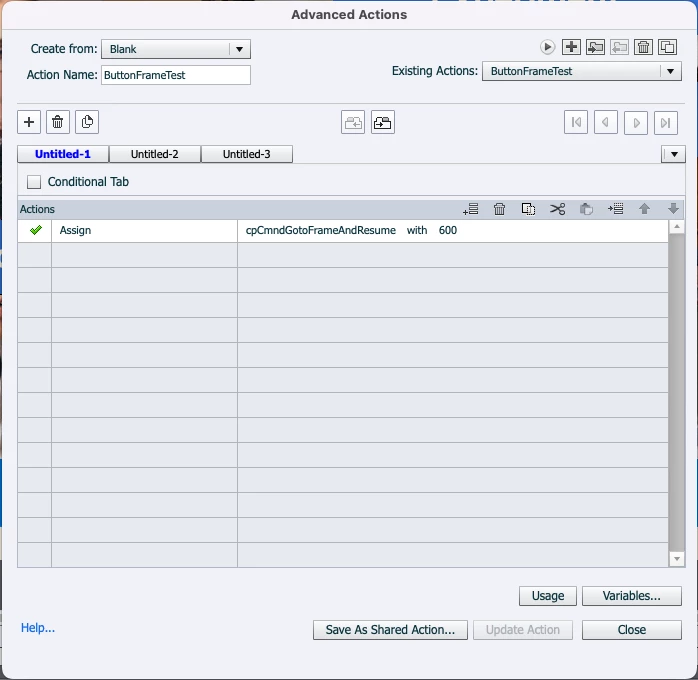
I created this simple advanced script to jump to a specific frame on a slide, then applied the advanced action to a button. it jumps to an unspecified slide instead.


The value is calculated as frame 20 x 30 FPS = 600

Any thoughts?
 

This topic has been closed for replies.

4 replies

Participant
March 20, 2023

I apologise if the functionality in Captivate was not available at the time of the question.

is the following workaround more practicable ?

-Add a blank, small interactive video as a placeholder
-Place it outside the stage and make it invisible.
-for interactive videos, you can add bookmarks very comfortably and also control them.

I am not yet that experienced with Captivate. In my quick & dirty test it works


nice greetings

RodWard
Community Expert
Community Expert
May 21, 2022

Your current script will go to the frame that is 600 frames from the very first frame in the project, not the first frame in that slide.  Is that what you wanted?

TLCMediaDesign
Inspiring
May 20, 2022

That would only work if it is on the 1st slide.


Other slides you need to use:


Expression   cpCmndGotoFrameAndResume = cpInfoCurrentFrame + 600

Known Participant
May 20, 2022

Thanks to both of you, I'll try this now.

Lilybiri
Legend
May 20, 2022

Maybe you could have a look at this blog post:

http://blog.lilybiri.com/micro-navigation-introduction

Your 'advanced' action (it is only one command, could have been a simple action) will jump to 20 secs in the project. If the slide with the button triggering that action is not longer than 20 seconds that will indeed be to another slide. Frame counter is over the whole project.

BTW the action would be more useful if you used cpInfoFPS and calculate the frames from the time in seconds. :

   Expression v_frame = 20*cpInfoFPS

   Assign cpCmndGotoFrameAndResume with v_frame


I would even prefer to put the time in a variable, which can be populated using a Text Entry Box... It would be an action allowing the user to jump to any time in the project.