Inspiring
March 22, 2013
Answered

jump to slide/advanced action not working

  • March 22, 2013
  • 1 reply
  • 1026 views

Hello There

I am currently using Captivate 6 and have setup a project which has a timer on the 1st question slide and then I have set up an advanced action so when then timer stops it will jump to the results slide otherwise it will continue on with the project.
Below is my advanced action.
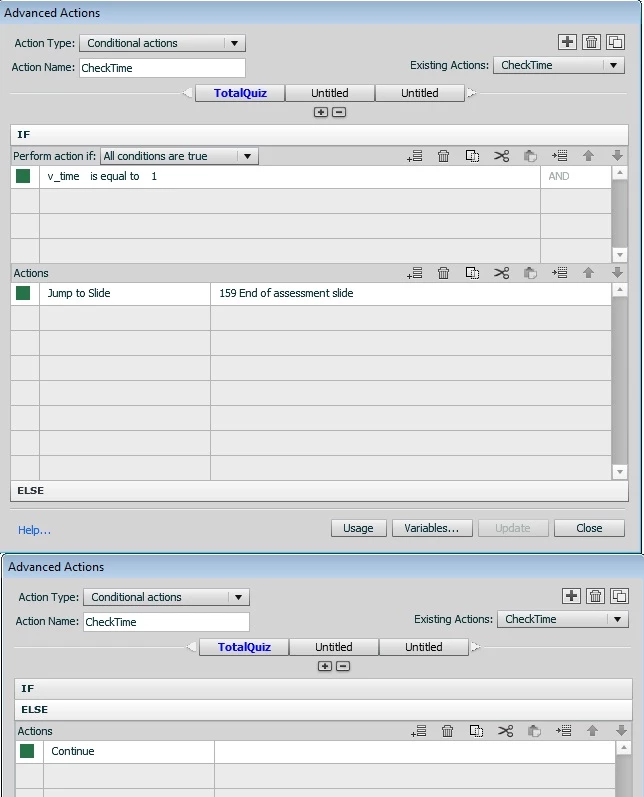
The timer variable is v_time which I have setup on the time and created in variables.

I have set each slide (excluding the first question slide and the results slide) with the CheckTime advanced action on entry and exit of the slide.

This used to work when I published/tested in the web browser. I have a copy of one I published in January which works but now for some reason it does not work.

I think it is an issue with the Jump To Slide action but I am not 100% sure.

I have tried to recreate a new project with the same advanced action but that still did not work.

I am stuck and feel like I am wasting my time. I have spent 3 days on this and I am ripping my hair out.

Please help!

Thank you in advance

Kim

    This topic has been closed for replies.
    Correct answer Lilybiri

    Kim, to which event did you attach the advanced action? If you are using the 'old' Timer widget included with CP (was also there in previous versions), it has no events, will only change the value of the associated user variable. You have to trigger the action by another event like a slide event (On Enter, On Exit). You can only have a message popped up when time is over, not prevent the user of answering the question.

    Second question: which version do you use? Did you associate the variable v_time in the Widget Properties? Were you able to type in the exact name 'v_time', because there is an issue with the Timer widget in 6.0.1 that prevents typing in certain characters. Maybe that is the issue that you are facing now. You have to be sure that the correct name is associated and that the variable exists. Last but not least, the values of the associated variable in 6 are now 'true' and 'false', not 0 or 1. I just checked the work flow this way with the Timer widget coming with 6.0 (have another newer version on 6.1):

    • created a user variable Vtime (because those characters are accepted in the Widget properties, no underscore, and capital V)
    • inserted the timer widget on first question slide, timed for rest of project, countdown with message and associated with Vtime
    • created a conditional advanced action like yours, but with true as literal value; this action will be triggered by each On Enter event for all question slides except first

    Is the timer set 'For rest of project'? Last tip: never use Submit All with the timer widget, because that feature will disable all Automatic jumping.

    Lilybiri

    1 reply

    Lilybiri
    LilybiriCorrect answer
    Legend
    March 22, 2013

    Kim, to which event did you attach the advanced action? If you are using the 'old' Timer widget included with CP (was also there in previous versions), it has no events, will only change the value of the associated user variable. You have to trigger the action by another event like a slide event (On Enter, On Exit). You can only have a message popped up when time is over, not prevent the user of answering the question.

    Second question: which version do you use? Did you associate the variable v_time in the Widget Properties? Were you able to type in the exact name 'v_time', because there is an issue with the Timer widget in 6.0.1 that prevents typing in certain characters. Maybe that is the issue that you are facing now. You have to be sure that the correct name is associated and that the variable exists. Last but not least, the values of the associated variable in 6 are now 'true' and 'false', not 0 or 1. I just checked the work flow this way with the Timer widget coming with 6.0 (have another newer version on 6.1):

    • created a user variable Vtime (because those characters are accepted in the Widget properties, no underscore, and capital V)
    • inserted the timer widget on first question slide, timed for rest of project, countdown with message and associated with Vtime
    • created a conditional advanced action like yours, but with true as literal value; this action will be triggered by each On Enter event for all question slides except first

    Is the timer set 'For rest of project'? Last tip: never use Submit All with the timer widget, because that feature will disable all Automatic jumping.

    Lilybiri

    Inspiring
    March 25, 2013

    Hello Lilybiri

    I attached the advanced action to the slide event, on entry and exit.

    I was using version 6.0.0 but then just upgraded on Friday to 6.1.0 to check if the update would help but that has not helped. 

    Yes, I did you the variable v_time and yes I was able to type in the exact name. I did originally create the project in version 5 and then I upgraded to version 6. I am not sure if that makes any difference.

    Yes, the timer is set for the rest of the project.

    Ok, i did not know that the variables are now true and false not 0 and 1.

    I have just tried my project and I followed the steps to rename the variable to Vtime, I changed the literal value of my conditional action to true instead of 1 and I changed the Submit All to Optional in the Preferences and it now all works!


    Thank you so much for your help!! This was really stressing me out.

    Your a gem

    Thanks

    Kim

    Lilybiri
    Legend
    March 25, 2013

    I think you upgraded to 6.0.1 not to 6.1 because the last is only available to subscription users.

    It was an annoying thing, have been  cursing it as well (now got an updated version, but it is not publicly available. Is it possible to mark the question as answered? I know that it is a workaround, but at least it is functioning.

    Lilybiri