
jonathanp9139783
Known Participant
June 27, 2018
Answered

Jumping to a place in the timeline when revisiting a slide

  • June 27, 2018
  • 1 reply
  • 1525 views

Hi group.

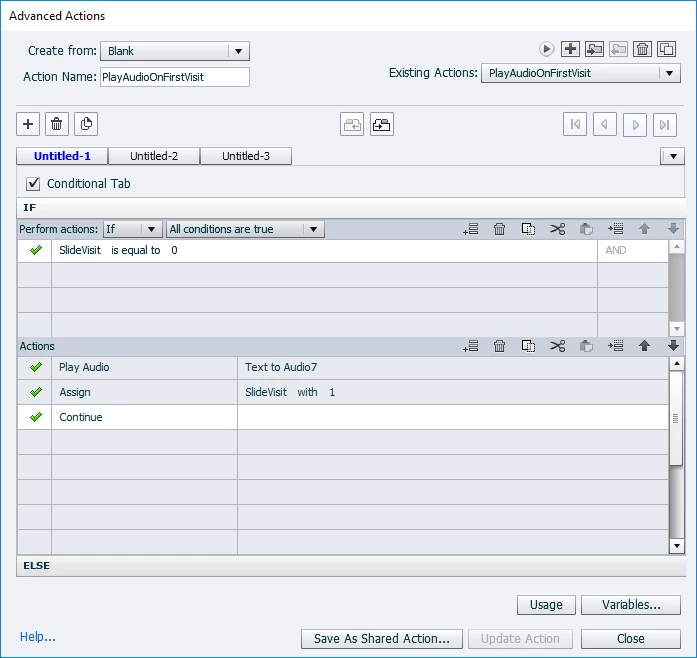
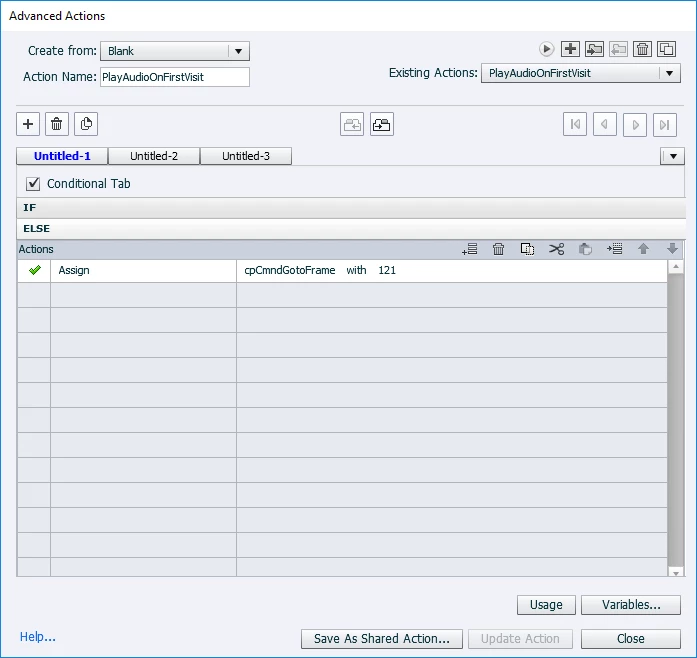
I have an advanced action that is used to stop the playback of audio when returning to a slide.There are certain points in the audio of the slide where buttons appear. When I return to the slide, I want the buttons to automatically show instead of waiting until their appearance on the timeline. I got the audio part to work fine, so when I return to the slide the audio doesn't playback. But the buttons are still not appearing until their appointed time on the timeline. I tried using another Assign item to set the variable GoToFrame to a point after the buttons appear on the timeline, but it's not working. Anything else I could try? I've included screens of my conditional action below. Thanks.
    This topic has been closed for replies.
    Correct answer Lilybiri

    OK my apologies...three buttons. Two are used to jump to specific slides to view content, and the third is an actual Continue button to move onto to the next bit of material (also has an action to jump to the slide directly after the slides used for the other two buttons) in this particular presentation. And I understand what pause points do. They pause the timeline. Sorry if I didn't make it clear that I understand what those mean. So since I don't understand apparently the importance of them, could you please advise? They're not important in this particular instance as we both agree. But maybe for the future so I end up knowing what I'm doing?


    There is a big difference between Pausing the timeline with a Pause command or the button on the playbar and having a pausing point, because items are not affected the same way. A pausing point is meant to stop the playhead until an action by the learner is done, for a button that means a click on the button.  

    In your case, still do not understand the meaning of the third 'Continue button'? Which action is it triggering? If it is simply to continue, why do you stop the playhead at that moment? Nothing happens after the pausing point of that button? It will not even pause the slide audio, unless you activate that option. 

    Watch a couple movies:

    Captivate's Timeline

    Pause and Pausing Point

    Read this blog post (you'll find links to more Timeline articles):

    Pausing Captivate's Timeline

    1 reply

    Lilybiri
    Legend
    June 27, 2018

    Exactly described that situation in two recent blog posts:

    Play Audio once on First Visit - Captivate blog

    Advanced to Shared Action: Step-By-Step (micro-navigation showcase) - Captivate blog

    I preferred a shared action as you will see because it also allows to solve a similar problem (Force first view).

    If you had shown a screenshot of the timeline, could have told you to which number you have to change the present '121". It needs to be just after the appearance of the last button. Try my shared action, you will not have to calculate the number of frames.

    jonathanp9139783
    Known Participant
    June 27, 2018

    Well I'll take a loot at these, and in the mean time here's my timeline. The two items are labeled as buttons.

    Lilybiri
    Legend
    June 27, 2018

    Why do you have staggered pausing points for those buttons? To be in the active part of the first button and the third buttons should already have appeared, you'll need to jump to about 4 seconds.

    Do you understand how pausing points are used in the Timeline? Have lot of posts and movies published about that subject.