
Participant
April 5, 2022
Answered

Layering issue with multi-state buttons

  • April 5, 2022
  • 2 replies
  • 1107 views

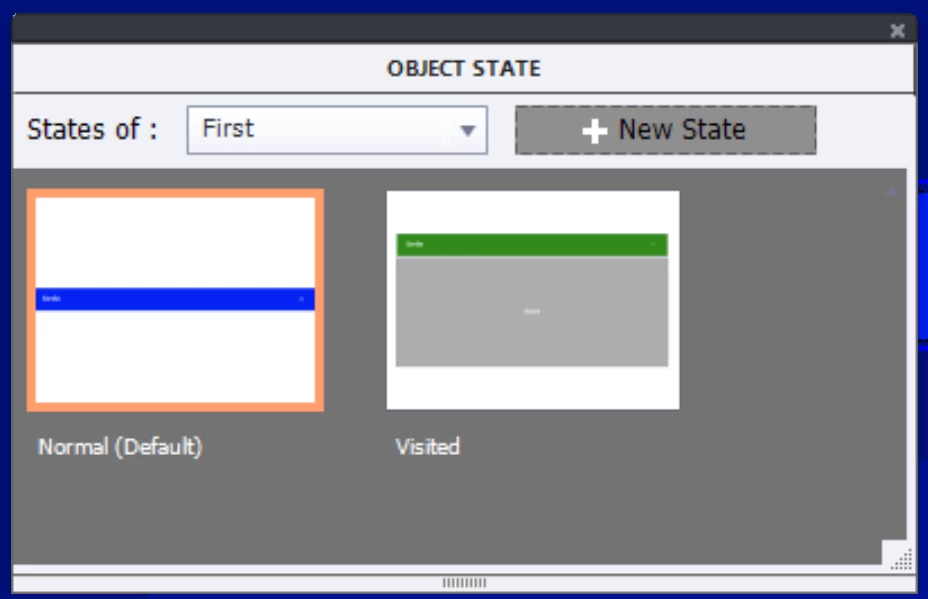
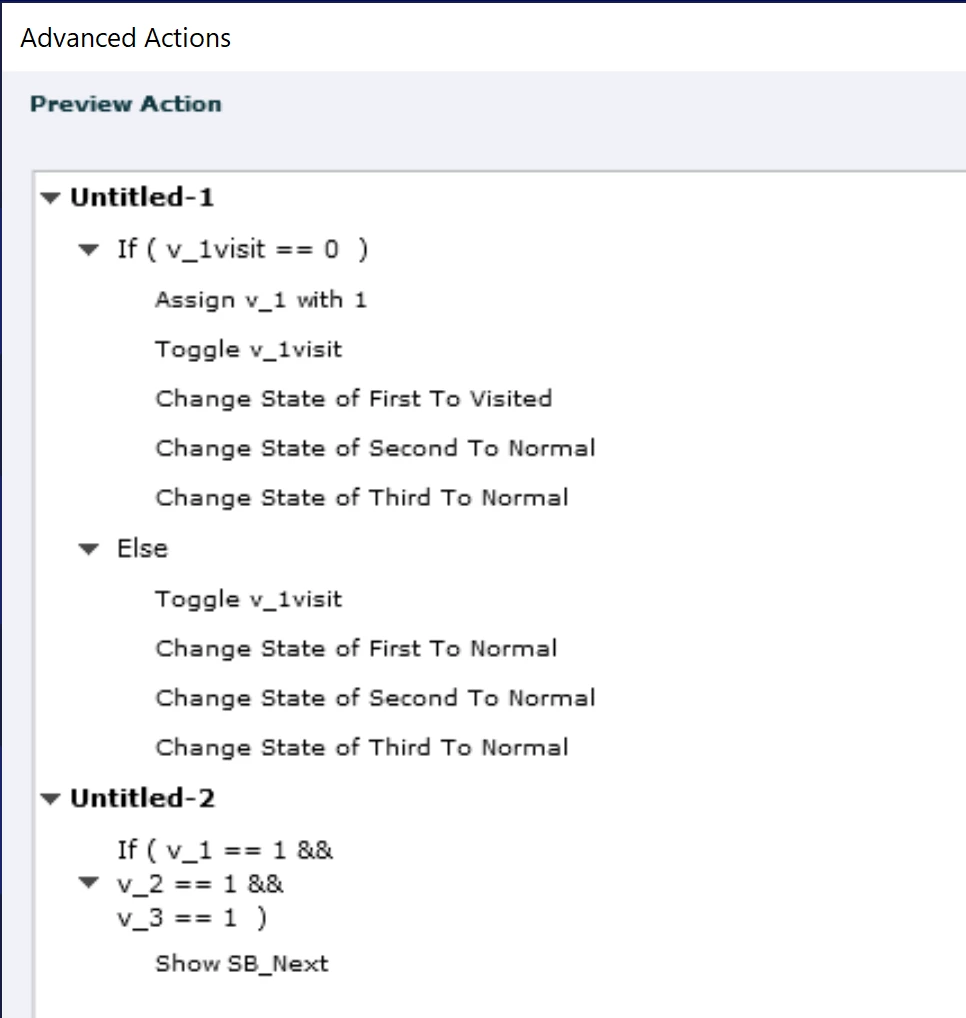
See attached. I have created a custom accordion interaction that forces the learner to click on each tab before the Next button appears. Everything is working properly except the + signs from the lower Normal state objects show on top of the upper Selected state objects even though they are lower in the Timeline. Any suggestions for how to correct this? I have tried inserting the + as both a text caption and .svg with same result. Thanks!
    This topic has been closed for replies.
    Correct answer Lilybiri

    Thank you for your response

    • Captivate 2019 release 11.5.5.553
    • Yes, the + is an extra object in the Normal state - sorry I thought you’d be able to zoom in on the screenshots
    • See attached for the script in Preview window
    • I was hoping that if btn_WRHA1_PS is above the other objects in the timeline, that any objects associated with the btn_WRHA1_PS Selected state would cover the other objects on the slide, eliminating the need for me to hide the other + signs

    I did zoom in, but the Object State panel was included in a global screenshot and couldn't exactly see how it was set up.

    Reason is that the InBuilt states always have priority over the custom states, at least for the added objects.

    Easy fix would be to use the InBuilt Visited state instead of your custom Selected state. I double-checked quickly in simple project. It has only three tabs but works as expected.

    2 replies

    Paul Wilson CTDP
    Community Expert
    Community Expert
    April 5, 2022

    The only thing I can suggest is to check the transparency of the objects (perhaps the + is showing through the other multistate objects). Your advanced actions look right for this interaction. I did something similar in this video: https://youtu.be/q72erxHjJd8 

    Paul Wilson, CTDP
    Participant
    April 5, 2022

    Thanks Paul. Yes, it was your excellent  video that gave me this idea. Apologies for not giving you credit in my original post. See attached, I've checked the transparency of each of the grey boxes in the Selected states - they are a solid fill with 100% opacity. 

    Paul Wilson CTDP
    Community Expert
    Community Expert
    April 5, 2022

    Well I'm at a loss. 

    Paul Wilson, CTDP
    Participant
    April 5, 2022

    Sorry - forgot to mention I am using Captivate 2019 on Windows 10

    Lilybiri
    Legend
    April 5, 2022

    Couple of questions:

    • Exact version number please. Under CP2019 there have been about 6 releases. Check the full version number under Help, About Captivate.
    • Is the + button added as extra object under the Normal state? That is not visible in the tiny screenshots.
    • Please use the Preview Window for screenshots of conditional actions with one or more decisions. It will be much easier to read. You open it with this highlighted button. 

      If you are new to advanced actions read this blog: http://blog.lilybiri.com/advanced-actions-dialog-box-in-captivate-2017

    BTW Forgot to mention that the stacking order in the Timeline has nothing to do with the states, maybe I misunderstand your sentence: "... the + signs from the lower Normal state objects show on top of the upper Selected state objects even though they are lower in the Timeline. ".  I think you want to hide the + signs for the non active buttons when another button is in Selected state? 


    Participant
    April 5, 2022

    Thank you for your response

    • Captivate 2019 release 11.5.5.553
    • Yes, the + is an extra object in the Normal state - sorry I thought you’d be able to zoom in on the screenshots
    • See attached for the script in Preview window
    • I was hoping that if btn_WRHA1_PS is above the other objects in the timeline, that any objects associated with the btn_WRHA1_PS Selected state would cover the other objects on the slide, eliminating the need for me to hide the other + signs