elearningbuilder11
Inspiring
April 21, 2016
Answered

Layers in CP9 ?

  • April 21, 2016
  • 2 replies
  • 333 views

Hello,

In CP 7 there were menu buttons to move items up and down in the timeline (like layers) allowing you to for bring things more "forward" or "back" in the slide like an "arrange" command.

Where are these buttons or menu options for doing this in CP9? I cant seem to find them..?

Thank you.
    This topic has been closed for replies.
    Correct answer Lilybiri

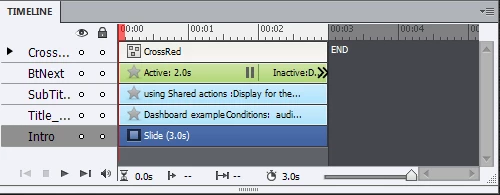
    I never did see those buttons, are you not confusing with other places? Here is a screenshot of the Timeline panel in CP7:

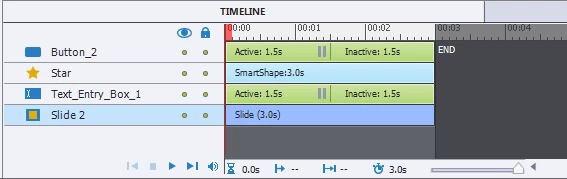
    And this is one from CP9;

    I don't see a difference. An important difference for the Timeline panel is the integration of the former Effects panel within it. But no buttons disappeared AFAIK.

    If you want to change the stacking order, select an object timeline and drag it up or down.

    Maybe you are looking for the Arrange menu? It is still in the right-click menu.

    There is also an Align toolbar, which can be opened from the Window menu, and the last four icons can be used as alternative for the Arrange options:

    2 replies

    elearningbuilder11
    Inspiring
    April 28, 2016

    Yup .. that was it.. The align toolbar from the window menu.. that's what I was looking for.

    Thank you again! 

    Lilybiri
    LilybiriCorrect answer
    Legend
    April 21, 2016

    I never did see those buttons, are you not confusing with other places? Here is a screenshot of the Timeline panel in CP7:

    And this is one from CP9;

    I don't see a difference. An important difference for the Timeline panel is the integration of the former Effects panel within it. But no buttons disappeared AFAIK.

    If you want to change the stacking order, select an object timeline and drag it up or down.

    Maybe you are looking for the Arrange menu? It is still in the right-click menu.

    There is also an Align toolbar, which can be opened from the Window menu, and the last four icons can be used as alternative for the Arrange options: