
Participating Frequently
March 28, 2018
Answered

Learning Interactions doesn't have Web object widget and two YouTube widgets

  • March 28, 2018
  • 1 reply
  • 805 views

Hi all,

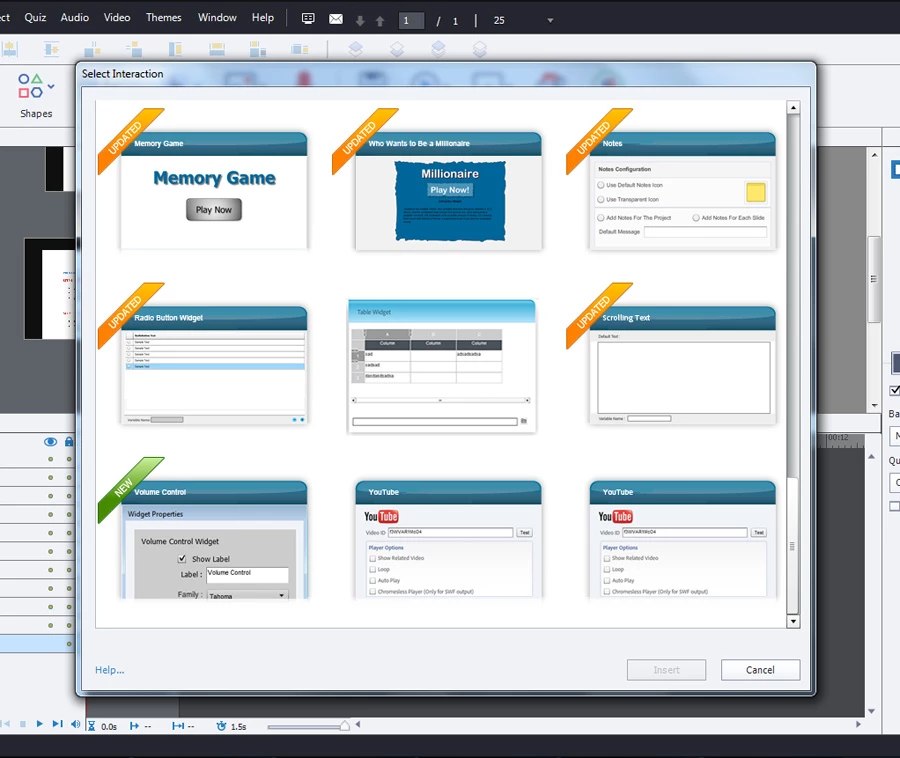
I am using Adobe captivate 2017 release and trying to insert a PDF through Learning Interactions. Surprisingly I found the Web object widget missing from my learning interaction window and have two Youtube widgets. Is this just my machine issue or anyone else has this problem???

Here is a screenshot of it.
This topic has been closed for replies.
Correct answer Lilybiri

Thanks for the prompt reply Lilybiri!

I closed captivate and deleted the "Interactions_10_0" in Public Documents\Adobe\eLearing Assets. Note: I have only captivate 2017 and no other previous version. When I open captivate the "Interactions_10_0"  folder gets automatically created with the same two youtube widgets included namely "Youtube.wdgt" and "YoutubeFix.wdgt". I dont understand whats going wrong here.


This means even the original folder Interactions in the installation folder of Captivate has both widgets. I ddin't check, sorry. If you want to get rid of one of them, please use the other approach

I checked: the Youtube is dated 6/4/2017, whereas the YoutubeFix is pretty recent: 18/3/2017. If you don't like to have them both, delete the first one. There were issues with that widget.

1 reply

Lilybiri
Legend
March 28, 2018

I don't remember when (think CP8, could have been CP9 as well) that widget was replaced by the option 'Web' under the Big Button ''Objects'. Haviing two YouTube widgets may be due to the fact that you had an older version before didn't clean Preferences when installing new version.

Participating Frequently
April 4, 2018

Yes you are right! I din't clean preferences when installing new version. I tried cleaning it now and restarted Captivate but the widget still appears. Any other workaround you could suggest?

Lilybiri
Legend
April 4, 2018

You mean two YouTube widgets?

Look in Public Documents\Adobe\eLearing Assets. You'll see the subfolder(s) 'Interactions XX' (If you have more than one version, you can have several subfolders). Those are the interactions you are seeing in the thumbnails panel'.  You could refresh that subfolder while Captivate is closed,, which would cause a new copy from the original folder to be installed. However the quickest way could be looking for the two Youtube files, and delete the oldest one. Updates are often pushed to this subfolder.