Known Participant
July 20, 2020
Answered

LMS marking courses as complete but they are not actually completed

  • July 20, 2020
  • 1 reply
  • 2350 views

Hi everyone


Hoping someone might be able to assist and help clarify things.


I am publishing a course with 6 quiz questions to my LMS (Oracle) using 1.2 SCORM.


When I test the course and assign it to myself and others, the course plays, however midway through if I leave the course, the LMS marks the course as complete instead of incomplete.


My publish settings are as follows:
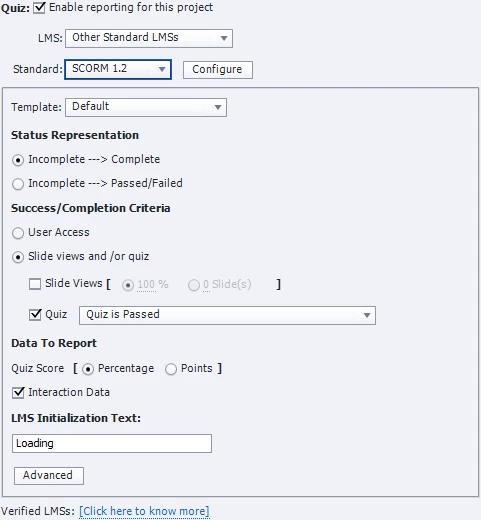


Can any one help with what it is that I am getting wrong? The Oracle forums a colleague of mine has read said that it is all content related not LMS related.


Any help would be amazing. Due to security restrictions within the business I am unable to upload the project to scorm cloud, so I cannot test this option.


Thank you everyone.

This topic has been closed for replies.
Correct answer RodWard

Escape version and session ID is not the setting I was referring to.  It's not related to scoring in any way and usually only applies to AICC courses, not SCORM. If that is the ONLY box selected on the dialog for LMS Advanced Settings then it would indicate that Resume Data Bookmarking should be currently working because to STOP the bookmarking you have to select the NEVER send resume data checkbox. 


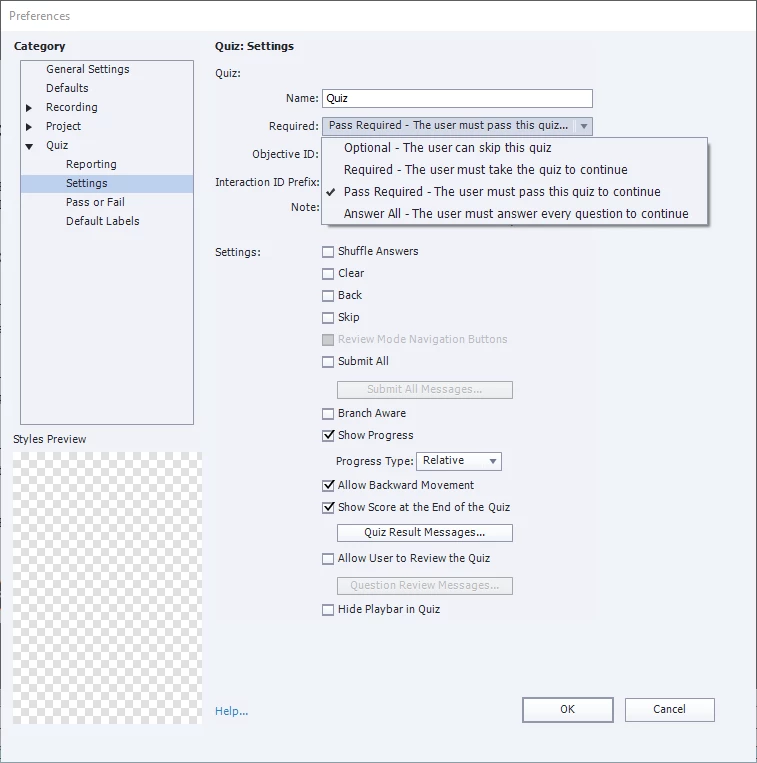
As I said, the Pass Required setting is often misinterpreted.  You should still try changing the Quiz > Settings > Required dropdown setting to Optional because that is the safest setting for most LMSs.  Setting to Optional in no way prevents you from setting a 100% passing score to be required by the learner for the overall module quiz.  Setting this dropdown to User must pass the quiz to continue only affects the behaviour of the Continue button on the Quiz Results slide.  If the user reaches the Quiz Results slide and has NOT yet passed the quiz, the continue button will not work and they cannot progress beyond the Quiz Results slide. This can get you into a number of dead-end situations because the quiz result actions only fire when the timeline passes from the Quiz Results slide to the next slide AFTER that.


I have encountered some LMSs where we had to prevent the learner from completing the module unless they had passed the quiz, but these situations are rare.  From the description you gave, it seems your issue occurs well before you get to the Quiz Results slide.  Your LMS seems to be awarding completion based only on accessing the module, not whether or not a passing score was submitted (as would be indicated by your Quiz Settings).

1 reply

RodWard
Community Expert
Community Expert
July 20, 2020

What settings are you using under the Advanced button for Resume Data Bookmarking?  If Never Send Resume Data is selected, try turning it off and retest.  Also try setting the Quiz Settings > Required drop-down to Optional instead of Pass Required.  This setting is often misinterpreted.

Known Participant
July 20, 2020

Hi Rod

Thanks so much for your reply.

The Resume Data Booking setting is set to "escape version and sessiosn ID"

With regards to the quiz setting I selected pass required because a 100% pass is required by the user as the course is about security within the business.


RodWard
Community Expert
RodWardCommunity ExpertCorrect answer
Community Expert
July 20, 2020

Escape version and session ID is not the setting I was referring to.  It's not related to scoring in any way and usually only applies to AICC courses, not SCORM. If that is the ONLY box selected on the dialog for LMS Advanced Settings then it would indicate that Resume Data Bookmarking should be currently working because to STOP the bookmarking you have to select the NEVER send resume data checkbox. 


As I said, the Pass Required setting is often misinterpreted.  You should still try changing the Quiz > Settings > Required dropdown setting to Optional because that is the safest setting for most LMSs.  Setting to Optional in no way prevents you from setting a 100% passing score to be required by the learner for the overall module quiz.  Setting this dropdown to User must pass the quiz to continue only affects the behaviour of the Continue button on the Quiz Results slide.  If the user reaches the Quiz Results slide and has NOT yet passed the quiz, the continue button will not work and they cannot progress beyond the Quiz Results slide. This can get you into a number of dead-end situations because the quiz result actions only fire when the timeline passes from the Quiz Results slide to the next slide AFTER that.


I have encountered some LMSs where we had to prevent the learner from completing the module unless they had passed the quiz, but these situations are rare.  From the description you gave, it seems your issue occurs well before you get to the Quiz Results slide.  Your LMS seems to be awarding completion based only on accessing the module, not whether or not a passing score was submitted (as would be indicated by your Quiz Settings).