Participating Frequently
April 30, 2014
Question

LMS reporting using SendTrackingDataAtEnd

  • April 30, 2014
  • 2 replies
  • 1337 views

We are using Captivate 7 to report percentage scores to our LMS (CertPoint/inFor), with intermittant results. Sometimes the scores will pass, other times they will not, which is upsetting a large client base. There are 14 courses in the series.

Originally the courses were published using the Default template. I've republished them using SendTrackingDataAtEnd. However, we are experiencing the same results. The questions are pulling from a question pool of 10 questions. We are showing the results slide at the end.

I've also tested to make sure the question slides are all 3 seconds and are paused at around 1 second. I hate to keep republishing these courses since many are long and the user can't move forward until the end of each recorded slide (more like a slide by slide presentation) and when I republish it, of course that breaks the bookmarking. Any poor user without their score passing to the LMS now has to go through the entire thing to try and resubmit.

It would be great if we could find a solution to this issue as this is our first time attaching Captivate courses using SCORM and I'd like to be able to do all our courses in Captivate if we can get it working reliably.


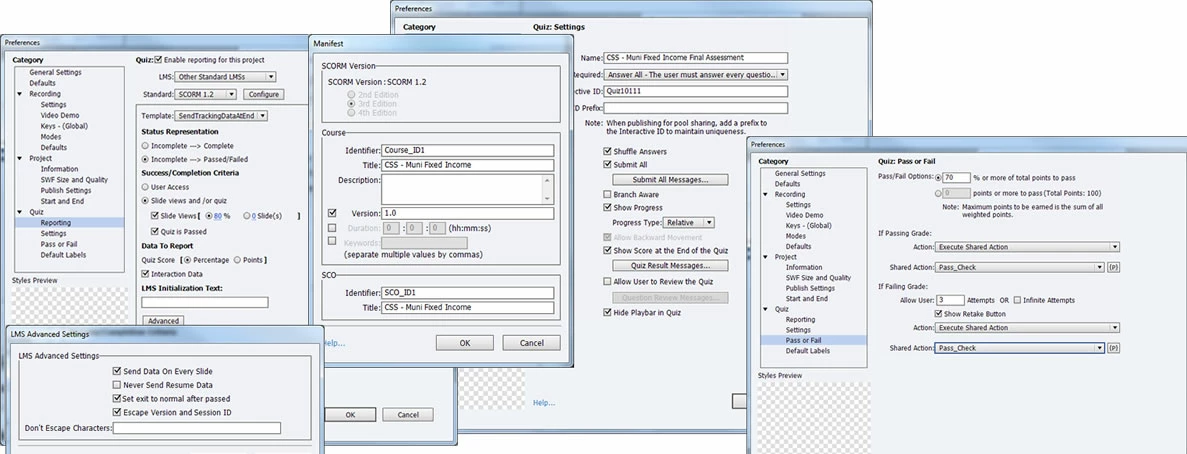
I'm attaching images of the Quiz Properties. Is there something I am missing/doing wrong? I'm wondering if it could have something to do with the Identifiers. I didn't update those at all.

Thanks!
This topic has been closed for replies.

2 replies

TLCMediaDesign
Inspiring
May 1, 2014

I would also uncheck "Slide Views" in the first panel on the left.

KrystineHAuthor
Participating Frequently
May 1, 2014

Thanks, TLC. This was a request from the project sponsor as they require them to view all pages. However, there is really no way around it the way I designed the course.  I'm not sure it's necessary but also not sure it hurts.

Is there a reason this could be confusing the LMS or not allowing the scores to pass?  It's easy enough to remove, I'd just like to understand the 'why'.

Thanks!

TLCMediaDesign
Inspiring
May 1, 2014

I think it would be confusing, since it is set to 80% of slides viewed and a passing score. I would change it to 100% then.

If your passing score is 70% and slides viewed is 80% and they had attempted 7 out of 10 questions correct, did not attempt the last 3 and had viewed 80% of the slides, that would satisfy the completion criteria.

I always send data on every slide purely so the bookmarking will work.

RodWard
Community Expert
Community Expert
May 1, 2014

Make sure you have at least one slide BEYOND the Quiz Results slide, and make sure the learners ALL reach that final slide before closing their browser.  If your learners are closing their window BEFORE allowing the course to correctly report their score then that would explain your issues.

I usually rename the Continue button on the Quiz Results slide something like Register Your Score! and make it big and bold so that they don't miss the inference that UNLESS they take this action to register their score then they won't benefit from all their hard work.

Then on the final slide I place a 10 second dummy animation that makes it LOOK as though something is being communicated to the LMS with an outro audio music file playing as well.  Allowing this extra time on the last slide also helps ensure the data is transmitted to the LMS just in case the LMS latency happens to be high at that moment.

Bottom line is that most of the time this issue can be greatly alleviated by how you design your course and how you educate (manipulate) your learner behaviours.

KrystineHAuthor
Participating Frequently
May 1, 2014

Thanks Ron!

We do have a "Complete" slide that follows the Results slide. I had updated the "Continue" button to "Submit Assessment" with a notice that in order to receive credit for the course they MUST click the button. If they click it with a passing score it displays a message that they successfully passed the course and to give the LMS a moment to capture the score.  In all my testing however, the score passed immediately. If they don't the message states that they did not pass the assessment which is needed for credit and after 3 attempts their final score will be recorded.  Making SURE they reach that slide would be as easy as making them read and follow instructions!

I read your suggestion earlier on Register Your Score. I like that and suggested it to our team. I also will try extending the Complete slide. Currently set to 3 seconds.

Thanks for the reply and suggestions.