
Participant
June 12, 2019
Question

Locating the Captivate program

  • June 12, 2019
  • 1 reply
  • 1454 views

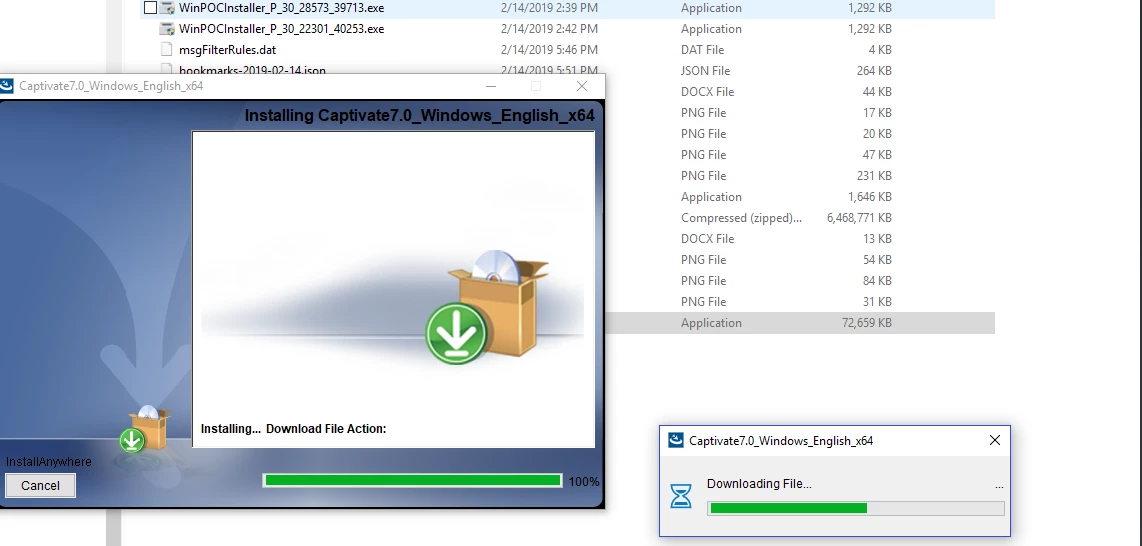
seems sooooooooooooooooo fundamental but guess what, it is a problem - I had to reinstall the older V7 version of Captivate and after executing the .exe file, which downloaded and installed (image below) - once the Dialog closed without apparently any errors, I tried to search for the captivate and there is NO sign of it.

Could someone advice how to locate and run the Captivate (from command prompt) in Windows 10? Does anyone think, there might be some install issues otherwise I should see the Captivate Icon, program (from Windows command prompt) to be able to open it?

On the system, the Adobe related folders in Program Files (Windows 10 Pro) do not show any material files. In the command prompt where I'm searching for the program, it shows the newer 2019 version, which was uninstalled successfully, for sometime but now it shows nothing...

thanks in advance
    This topic has been closed for replies.

    1 reply

    Lilybiri
    Legend
    June 12, 2019

    Not the answer you expect, but CP7 is NOT compatible with Windows 10 at all. You  will have to run Win10 in compatibility mode, same as for other very old applications.

    Participant
    June 12, 2019

    sure, thanks and I understand its a completely different set of topics for (a) This Adobe policies around backward compatibility and so forth around new versions OR (b) the several nuances, issues with the new 2019 version (which I happen to / forced to get now for Windows 10). It will really really also help if one of you can give me pointers around out what/why this difference when it comes to locating a program that seems to have been successfully installed/downloaded. Questions again:

    1) Adobe / Captivate Folders on Windows 10 - to specifically run / execute the Captivate V7 OR through command prompt in Windows. The folders could also help me reconfirm if indeed the V7 was installed properly. As in the image attached, that install window completed successfully without any exceptions but it did NOT create any Shortcut to access OR did I find newer Captivate files for V7

    2) The 2019 Version did do both (Shortcut and Folders). Also fyi, I did Uninstall 2019 before I reinstalled the V7.

    Thanks again!

    RodWard
    Community Expert
    Community Expert
    June 12, 2019

    If you look in both the Program Files > Adobe folder and/or the Program Files (x86) Adobe folder and neither one has Captivate 7 listed then the answer would be NO.  It's not installed.  If you didn't specify a different install directory than the default locations, then they should be in one of those folders.