
Known Participant
June 16, 2020
Question

Loop works the first time but not there after. Any guidance would be much appreciated. Thank you in

  • June 16, 2020
  • 2 replies
  • 361 views

HI I have an issue with some quiz settings, I have given the learner 3 attempts to pass the quiz, if they fail after these 3 attempts they are sent to the begining of the course again. This works fine the first time. But when I come to redoing the learning and complete the quiz once, the button the attached advanced interaction is linked to does not advance.


So to be clear it is my forth attempt when this happens. I am using Captivate 9 2019 
    This topic has been closed for replies.

    2 replies

    Lilybiri
    Legend
    June 16, 2020

    You ate tlaking about a new session. How did you set up the Quiz Preferences? Do you have it set to Infinite Attempts?

    As I have written recently, the advanced conditional action using a combination of AND and OR can be tricky. That may also be the reason, if the transfer of data is correct with the LMS. I would never set up the action that way. It would be safer to use a user variable to count the attempts in each session, since that variable is reset when you start a new session.  That will reduce the condition to two with the AND operator.

    Confusing is also that you talk about a 'button' to trigger that action? I would expect it to be triggered by the On Enter event fot  the Score slide. 


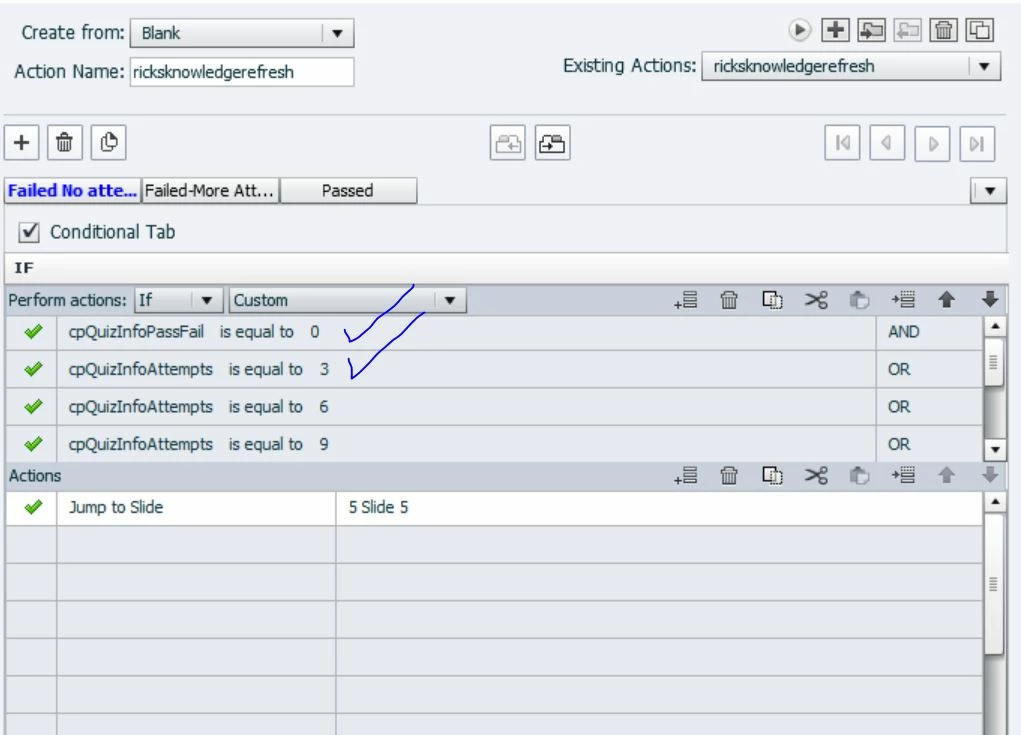
    Moreover I see tthat you have multiple decisions. Is it possible to insert a screenshot of the Preview window to see the complete action? You can get Preview using the first button (arrow) in the top control panel of the Advanced Actions dialog box.

    More information about the Advanced Actions (Advanced Interaction is a panel, which includes all kind of interactions) dialog box in:

    http://blog.lilybiri.com/advanced-actions-dialog-box-in-captivate-2017


    Known Participant
    June 16, 2020

    Hi


    Thank for feedback, as per your request here is my preview screen grab


    Slide 19 the start of the quiz again


    Slide26 is a feedback slide


    Slide 5 is the start of the training module

    Stagprime2687219
    Legend
    June 16, 2020

    The way I read this...

    You will only ever return to slide 19 prior to the third attempt because you only check it below three as the condition.


    I might suggest    if  !=  3, 6, 9, etc  so that you cover all the subsequent attempts between the retake of content every third attempt.


    Stagprime2687219
    Legend
    June 16, 2020

    A great troubleshooting tool in situations like this is to make a smartshape and place your variable inside of double dollar signs. Place it on any slides where you work with the variable or where it is adjusted.

    $$cpQuizInfoAttempts$$


    This will display the current value of that variable for you. You can make sure that the variables have the values you expect them to have or not. This can lead you to either revise your actions, how the actions are called, when they are called, where they are called, or perhaps a combination of the above.