
nate_davis1
Known Participant
June 24, 2015
Answered

Manual Clear Cache

  • June 24, 2015
  • 1 reply
  • 3596 views

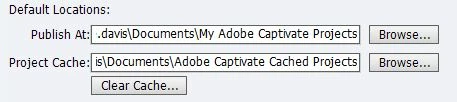
Hello everyone I need to clear up some space on my hard drive and would like to clear my cache, the folder called "Adobe Captivate Cached Projects" is sitting at 90GB. I have read a lot of people having issues when using the 'Clear Cache' button found under general settings. Would manually deleting these files also delete my projects, or could i just use the clear cache button?
    This topic has been closed for replies.
    Correct answer Lilybiri

    Those users had changed the paths in Preferences, and put both the projects and the cache in the same folder. To me that sounds like a newbie failure.

    1 reply

    Lilybiri
    Legend
    June 24, 2015

    What are those issues with the button? I use it all the time, or the AIR application that allows you to choose which cache to delete.

    Why would a manual delete also delete the projects? In your screenshot you see that they are in different folders.

    nate_davis1
    Known Participant
    June 24, 2015

    I have seen some posts on here saying clearing the cache deleted all thir projects except the ones which were open at the time.

    Lilybiri
    LilybiriCorrect answer
    Legend
    June 24, 2015

    Those users had changed the paths in Preferences, and put both the projects and the cache in the same folder. To me that sounds like a newbie failure.