
Marltutski
Inspiring
January 4, 2015
Answered

Manual Recording Only - Captivate8

  • January 4, 2015
  • 2 replies
  • 472 views

Hi - I've been stuck on this for a couple of hours.

I have read in these forums that all I have to do to record only manual screenshots is to

prepare to record a software simulation and then set this dialog box to look like this :
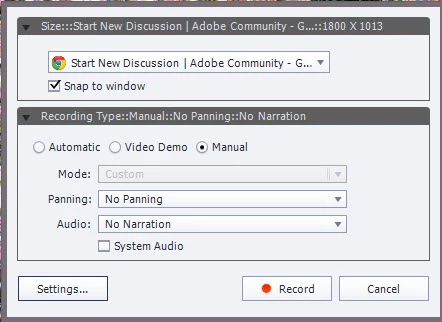
But when I do, it records everything.  I am trying to get a recording with only manual screenshots in it.  What am I doing wrong?

This topic has been closed for replies.
Correct answer Marltutski

I have finally answered my own question and I'm putting the answer here to prevent some other poor soul else experiencing the same issue.   The reason manual recording isn't working for me is the same reason that automatic recording wasn't working for me.

I am running Windows 8.1 with dual monitors.  So I have a monitor 1 and a monitor 2.

Automatic recording only works if the screen I am recording is on monitor 1.  And now I have realised that manual recording only works if the screen I am recording is on monitor 2. 

Obvious really .... 

2 replies

Marltutski
Inspiring
January 4, 2015

Rick - it's irony.

Having spent 12 hours figuring this out, the very last thing it is, is obvious.   

Lilybiri
Legend
January 4, 2015

Really, this is a very strange bug...probably new in CP8?

Marltutski
Inspiring
January 4, 2015

I don't think so. I had a look through this forum searching for discussions containing the word captivate and monitor. This reveals all sorts of issues to do with dual monitors. Here are a few of them.

  1. https://forums.adobe.com/message/6168009#6168009
  2. https://forums.adobe.com/message/6776818#6776818
  3. https://forums.adobe.com/message/5696494#5696494

One refers to Captivate 7.  I think that having read these, it may be not the monitor I am using but the fact I need to run and record on the same monitor. I will have to spend even more time testing it out. Can't wait. (The sentiments expressed in the last sentence were not intended to be taken literally.)

Marltutski
MarltutskiAuthorCorrect answer
Inspiring
January 4, 2015

I have finally answered my own question and I'm putting the answer here to prevent some other poor soul else experiencing the same issue.   The reason manual recording isn't working for me is the same reason that automatic recording wasn't working for me.

I am running Windows 8.1 with dual monitors.  So I have a monitor 1 and a monitor 2.

Automatic recording only works if the screen I am recording is on monitor 1.  And now I have realised that manual recording only works if the screen I am recording is on monitor 2. 

Obvious really .... 

Captiv8r
Legend
January 4, 2015

Hi there

I'd respectfully disagree that it's obvious. To me, it smacks of a bug. I would strongly encourage you to file a bug report using the link below. The recording process should really be monitor agnostic.

Click here to visit the Bug Report

Cheers... Rick