
Matching Question Drop Down too long for published view
Greetings All,
Noob here...I've been working with a template created by a co-worker who does not have the same issue as I do, which is:
In a matching question, I have 8 items in the first column, and 7 in the second column:
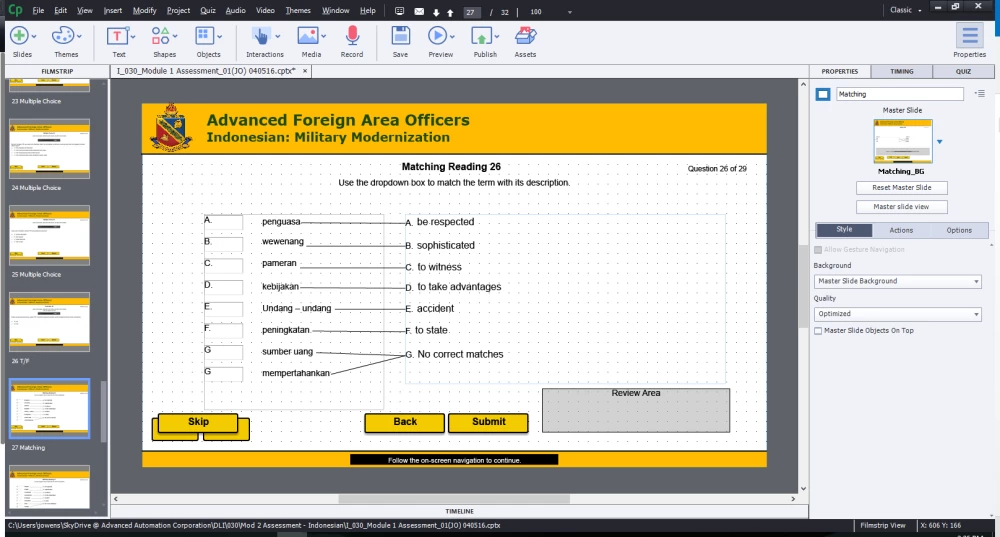
The result when published in HTML 5 is this:
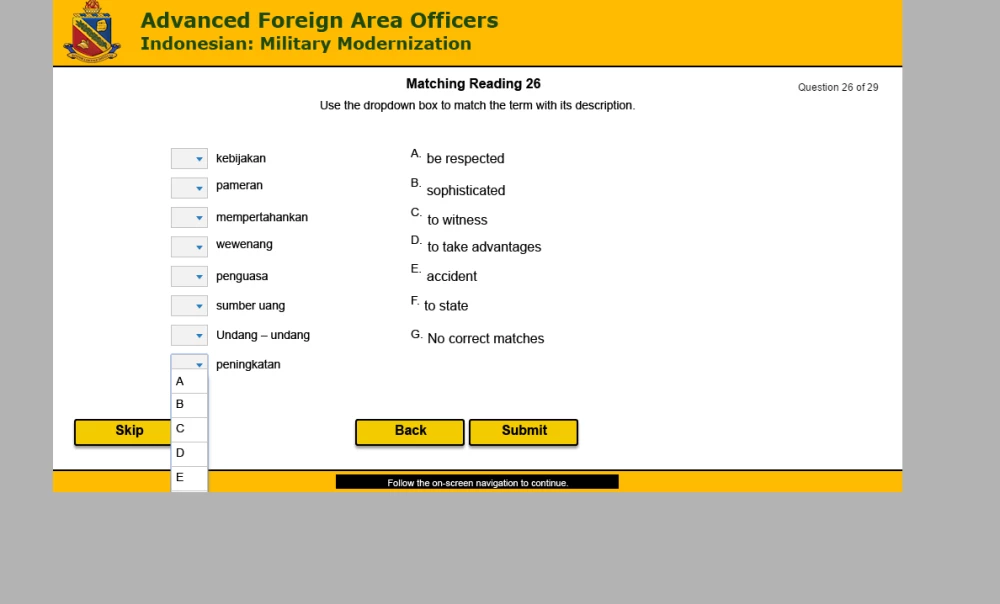
You can see that for the bottom choice, the ability to select "F" or "G" is impossible (Please note that I do understand that a user can "drag" matches as a workaround but do not wish to rely on this) and I'm puzzled as to why this exists on my computer and no one else's. I have saved the file and sent it to colleagues to preview, and the drop down will extend to show all the letter choices and work fine.
As another clue (that has lead me nowhere) to solve this, my colleague's dropdown "lines" separating the choices that I have above...very odd indeed.
I've searched from one side of the internet to the other and spend 2+ hours with Adobe Tech Support with no result.
Anyone experiencing this, or have any suggestions, I am willing to entertain them!
Thanks in advance for your time! I appreciate you reading....
Jeff
Other important info(?):
Windows 10
All Browsers up to date
Captivate 9


 AdChoices