Known Participant
May 12, 2021
Answered

matching quiz: false colors in drop-down-menu

  • May 12, 2021
  • 1 reply
  • 968 views

Hi,


I was already helped today (thanks!), now another problem showed up:


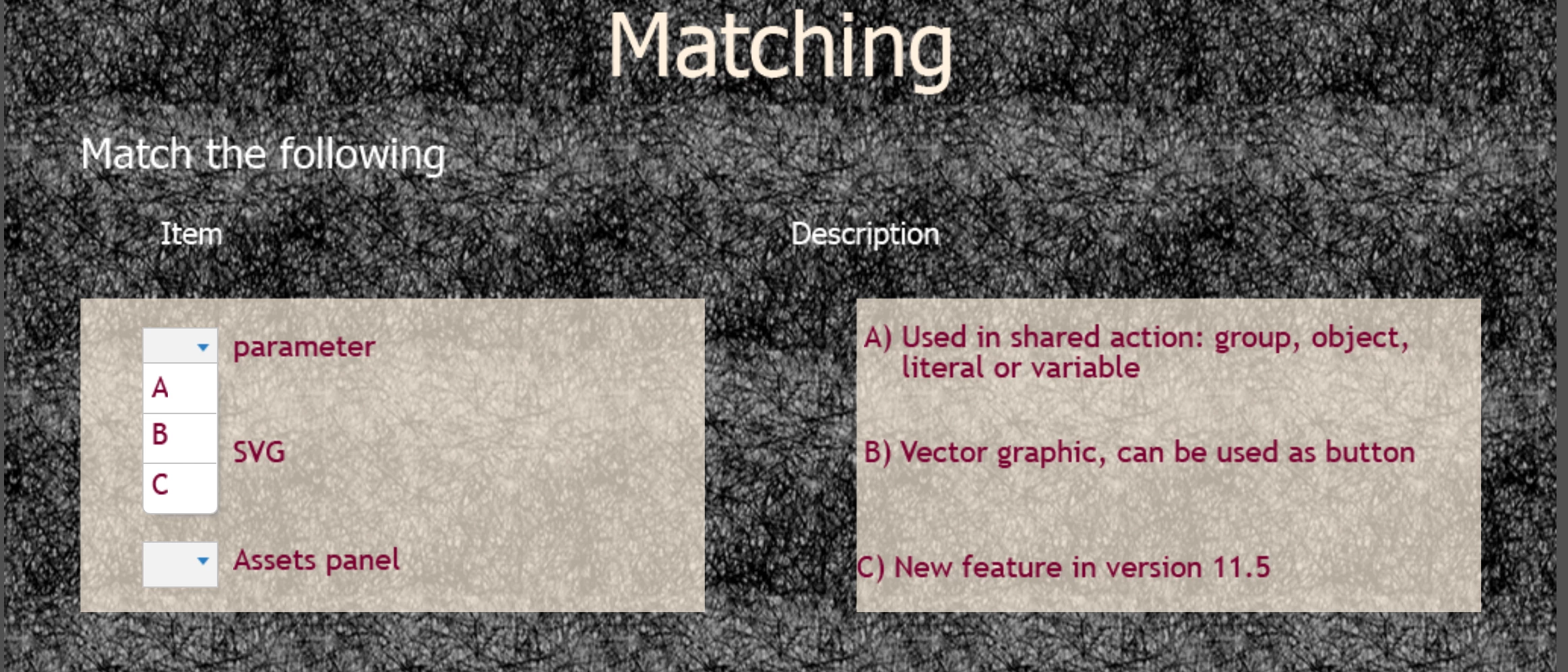
I inserted a quiz-slide for a matching quiz. The background of all my quiz-slides is dark, the fonts are yellow. The drop-down menu in the matching quiz also has yellow fonts - but on a white background (like all the drop-down-menus). I have already tried to fix it by changing the font-colors (in the master slide or in the normal slide), but the fonts in the drop-down-menu don't change. Unfortunately, yellow on white is nearly invisible.


I'm curious how this works...

    This topic has been closed for replies.
    Correct answer Lilybiri

    Something must be awry. I just double-checked with that theme using the lighter background, and edited the Answer style with this result:

    The answer style I used is different from the one for the other types of question slides. Summarizing:

    1. Edit the Quizzing Matching master slide. Add the light-colored shapes.
    2. Clone the Quiz Answer style to Matching Quiz Answer Style, and change the color to....
    3. Replace the style in the Quizzing Matching master slide to this new style.

    1 reply

    Lilybiri
    Legend
    May 13, 2021

    Formatting of matching quiz slide is 'absolut schrecklich'.

    You know I cannot answer in German (would be full of Fehler). The matching quiz slides have a dedicated master slide. I can only offer a workaround which I use when working with a theme having a dark background. Here is a screenshot of the solution: this is the master slide, and I needed two different heights for the columns:

    You see that I inserted two rectangular shapes, semi-transparent and in a light color over the dark background. There may be a way with JS, but this is for me an easy workaround. If you use a color of the theme color palette, this may be acceptable.

    The other workaround is to create a custom quiz slide using the Drag&Drop interaction. But to reproduce  all the fnctionality of regular quiz slides takes a lot of work.

    Known Participant
    May 13, 2021

    Hi,


    thank you for your answer. Unfortunately, it doesn't work... No matter what I change (color of rectangle, color of fonts, insert a semi-transparent rectangle), the drop-down menu (A, B, C...) that is used to match item and answer, stays the same: white background (as in "fill-in-the-blanks") and yellow font. The items can be changed in color, but not the drop-down-menu (at least I don't know how). When I change the color of the rectangle to yellow (in the master slide or in the working slide) and the fonts to darkblue, in the working-slide (do you know what I mean by this?) the A, B, C... in the drop-down-menu also is darkblue (screenshot "Fehlfarben Quiz Arbeitsfolie"). But when I go to the preview, they are yellow again (as shown in the screenshot "Quiz Fehlfarben" in my post yesterday).

    It is not to be perfect, but it should be visible 😕😕 I have to finish the project until tomorrow... If it doesn't work, I will have to get rid of these slides and try to find another quiz.

    Lilybiri
    LilybiriCorrect answer
    Legend
    May 13, 2021

    Something must be awry. I just double-checked with that theme using the lighter background, and edited the Answer style with this result:

    The answer style I used is different from the one for the other types of question slides. Summarizing:

    1. Edit the Quizzing Matching master slide. Add the light-colored shapes.
    2. Clone the Quiz Answer style to Matching Quiz Answer Style, and change the color to....
    3. Replace the style in the Quizzing Matching master slide to this new style.