
Missing "add hyperlink" option in my Captivate 2017 project
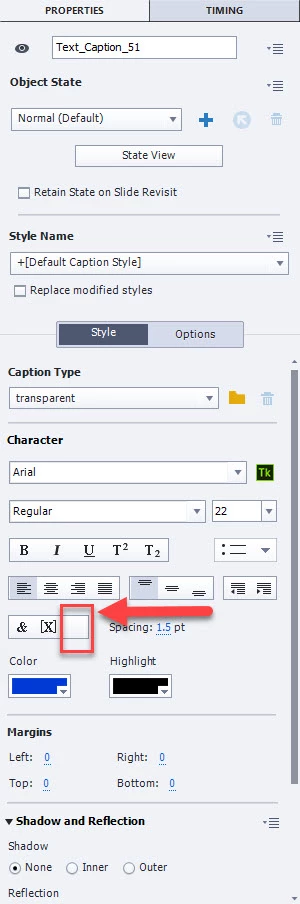
I'm working on a project that was created in Captivate 9. Our university upgraded to Captivate 2017, so that is what I'm editing the project in. There were hyperlinks added to the project previously. I want to add a couple more, and update one or two that are already in the project. However, when I go to the "character" accordion, the option to add a hyperlink is missing. (See bottom of the image below.) I have checked the forums as best I can and I don't see anything on this. I'm a novice on Captivate, still learning, but I checked the help and my instruction guide, and the option to create a hyperlink should be there but it isn't. When I hover over the link, it does not give me the URL, either in preview or edit mode, but I can actually click on it to go to the URL location. However, I can't add one or change any of the hyperlinks that are there. What am I missing?
Thanks for any help. This is mandatory compliance training that has to be updated soon, and we have NO Captivate experts in-house.


 AdChoices