


Missing Smart Shapes from Master Question Slides
My organization uses Captivate for building our assessments, and the assessment template is fed by the GIFT import.
When I am on the Master Slide for the Question, I can easily find the smartshapes for Success, Failure, and Hint, as well as the Review Area... but I cannot find the smartshape for "Retry Shape".
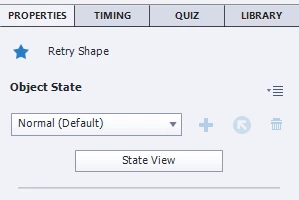
(this image was grabbed from the filmstrip)
This shape (the Retry Shape) appears on the filmstrip when questions are populated, because I have the Quiz Settings set to allow for 2 attempts, and I need the Retry message to appear if they dont get it right. (below).
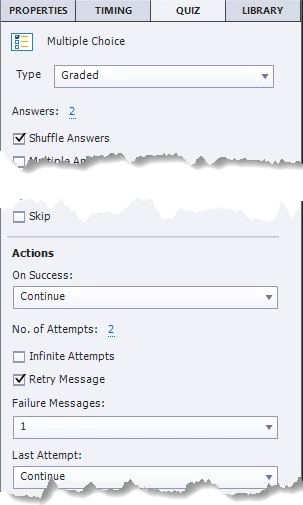
When the shape appears (after these settings are established on the slide), it appears completely unformatted, and with such small print that it can barely be read. This is a problem.
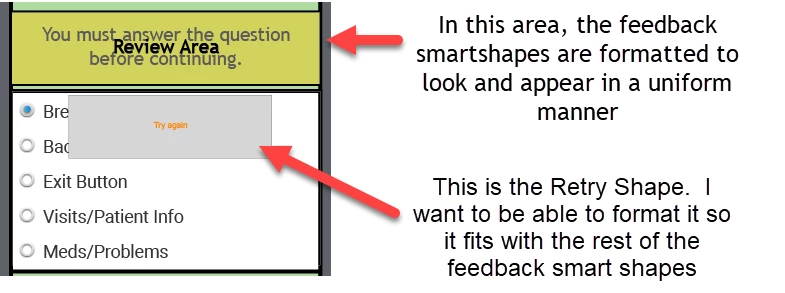
I need to format and set the parameters for the shape so that it matches the formatting of the rest of the assessment, but the only time it appears is when I see it on the populated questions slides... I cannot find it in the Master Slide. If I am only able to edit this shape after the fact, that means I will have to do it on every question slide, every time we create a new assessment... I know there has to be a place to find the Retry Shape smartshape object... but I am just not finding it.
Can anyone help me in finding this shape, so I can format it on the Question Master Slide level?
Thank you!
-j
 AdChoices